
Legal Calendaring Software
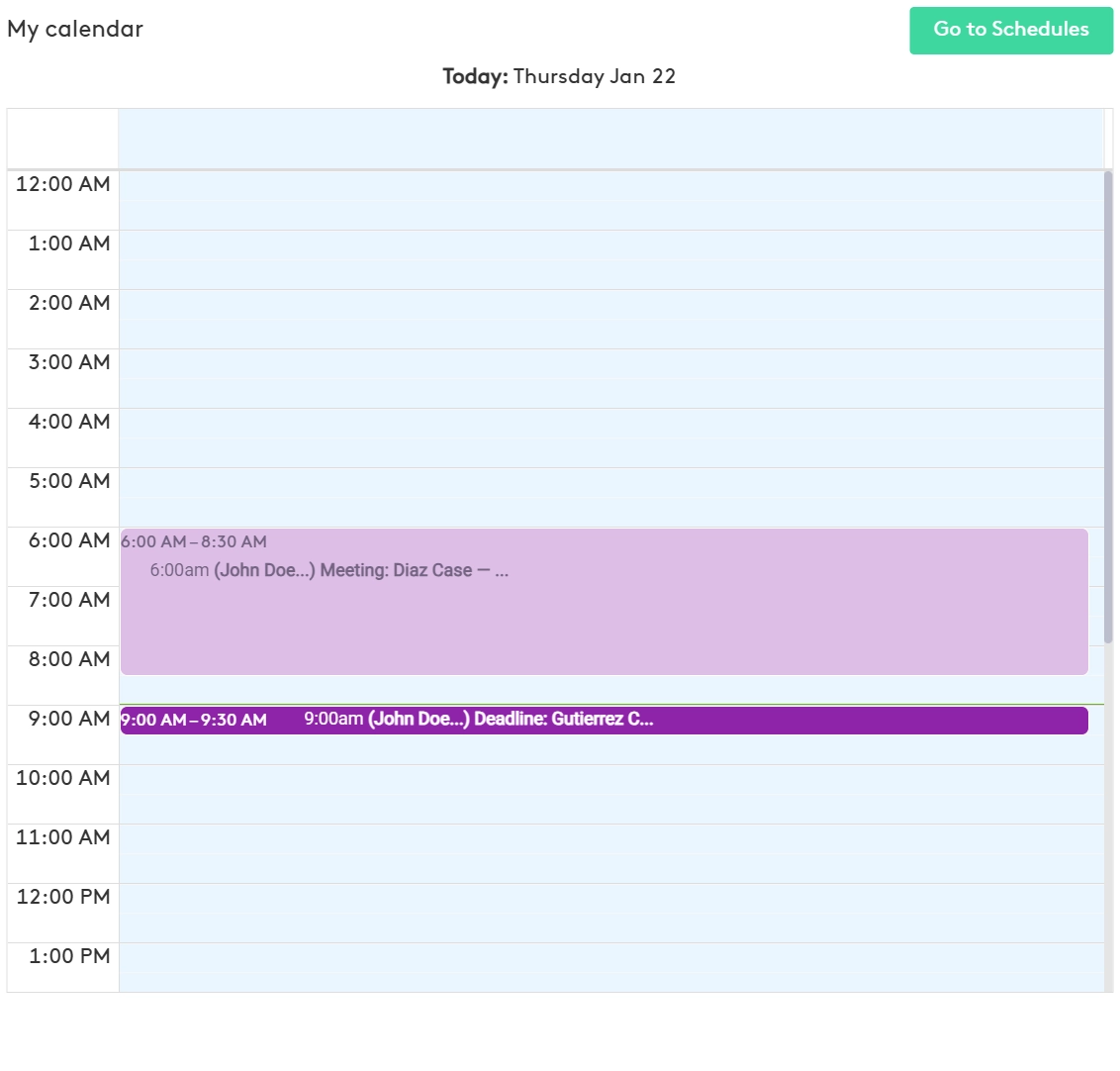
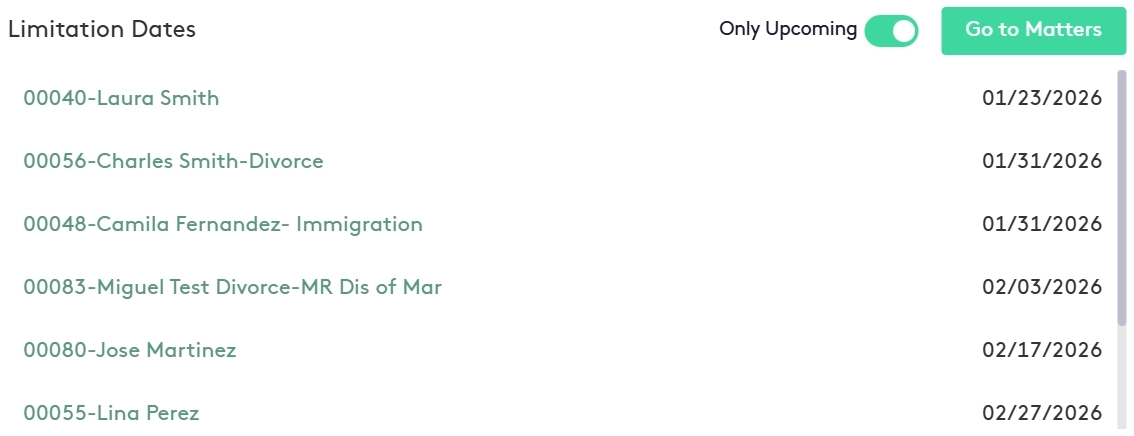
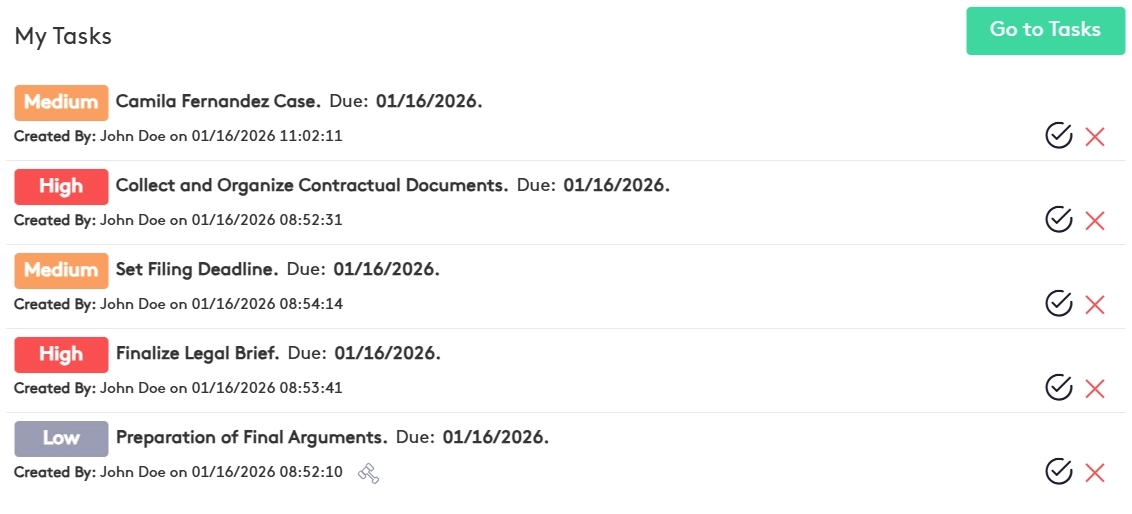
Maatdesk is legal calendaring and docketing software for law firms and attorneys. Every event, statute of limitations date, task due date and payment installment lives on one firm calendar, linked to the matter it belongs to, with reminders by email and in-app notification so no deadline depends on memory. Legal calendaring software is the part of a law firm's legal practice management software that holds every date a matter depends on - hearings, filing deadlines, statutes of limitations, client appointments, task due dates - and puts each one in front of the person responsible before it arrives. In Maatdesk, legal calendaring is not a separate app. The calendar lives inside the same platform as legal case management software, tasks, time tracking and billing, so a court date, the tasks that prepare for it and the time billed for it all sit on one matter record. That is what separates calendaring software for lawyers from a general calendar. A consumer calendar knows a date and a time. A law firm calendar has to know which matter the date belongs to, which attorney is responsible, whether the date came from a statute, a task or a payment plan, and who else in the firm needs to see it. Maatdesk answers each of those from the matter itself: set the Statute of Limitations on a matter and the date is placed on a dedicated calendar; assign a task and its due date goes on the Task calendar; set up a payment plan and each installment goes on the Payment Plan calendar. Maatdesk built its calendaring software for attorneys alongside practicing attorneys, and the sharing model shows it. A Firm calendar is shared with every user by default; each user has a personal calendar; any calendar can be shared with users or groups as Viewer, Editor, Free/Busy or Booking; Google calendars display beside the firm's own. Every event can carry reminders by email or in-app notification up to a month ahead, and guests - firm users or client contacts - reply Yes, No or Maybe from the invitation. Maatdesk states the limits plainly. Dates are entered by the firm: Maatdesk does not calculate deadlines from court rules or jurisdiction tables. Google calendars display inside Maatdesk; there is no Outlook or Office 365 calendar sync. And Maatdesk is a web app - it runs in the browser on a phone, tablet or desktop, with nothing to install and no native app to keep updated. Legal calendar software has to hold three kinds of dates: the ones you schedule, the ones the law imposes, and the ones you assign. Maatdesk keeps all three in view. The attorney calendar shows every event for the attorney signed in; the Limitation Date panel lists each matter's statute of limitations until it is marked satisfied; and every task due date is placed on the firm's Task calendar the moment the task is assigned. Each entry is tied to its matter, so the date, the file and the person responsible are never in three different places. Everything below is the Schedules module of Maatdesk's cloud-based legal software. It is not a legal calendaring tool bolted onto a practice management system: every calendar, event and reminder here is created from, or linked back to, a matter, a task or a payment plan somewhere else in the same platform. Law Firm Calendar Software That Starts From the Matter: A Firm Calendar Shared With Every User by Default, Alongside Each Attorney's Personal Calendar. Every Event Links to a Matter, and Time Spent on It Can Be Recorded as Billable Hours. Set the Limitation Date on the Matter and Maatdesk Places It on a Dedicated Statute of Limitations Calendar. Upcoming and Overdue Dates Stay Listed on the Dashboard Until Marked Satisfied. Add as Many Email or In-App Reminders as an Event Needs, Minutes to a Month Ahead. Task Due Dates and Payment Installments Get Their Own System Calendars and Their Own Reminders, and the Notification Center Flags Them in Any Browser. Share Any Calendar With a User or a Group as Viewer, Editor, Free/Busy or Booking. Booking Access Is Timezone-Aware and Can Block Double-Booking, So Staff Can Schedule Onto an Attorney's Calendar Within Available Hours. Invite Firm Users and Client Contacts to Any Event. Guests Receive an Email or Notification and Reply Yes, No or Maybe, So Maatdesk Doubles as Appointment Scheduling Software for Lawyers - Consultations, Depositions and Meetings Confirmed Without a Phone Call. Connect a Google Account to See Its Calendars Inside Maatdesk. Set Custom Weekly or Monthly Recurrence, Switch Between Month, Week, Day and Agenda Views, and Print the Agenda as a Court Calendar. Legal deadline management in Maatdesk runs in three steps, and each one is documented product behavior rather than a workflow the firm has to design for itself. Legal deadline tracking starts on the matter, continues on the task and ends on the calendar - the same three places the date will be looked for later. The moment a client is selected on a new matter, Maatdesk runs a conflict check - the step firms otherwise buy as conflict check software - and raises a Critical Conflict Detected alert if that client has been a participant or an adverse party in another matter. Then the Statute of Limitations field takes the limitation date and whether it is already satisfied. Maatdesk creates an event on the Statute of Limitations calendar and, while the date is unsatisfied, lists the matter on the dashboard's Limitation Date panel as upcoming or overdue. Change the date on the matter later and the calendar event moves with it. Every task creates its own event on the Task calendar. A task can be due on a fixed date, or due in a chosen number of calendar or business days before or after another task on the same matter, so a preparation chain - draft, review, serve, file - is entered against one anchor date instead of four unrelated ones. Each task can carry several reminders, and Maatdesk emails the users or contacts you selected a set number of hours, days or weeks before the task is due. See task management for attorneys. Hearings, depositions, closings and client meetings are added as events on the Firm calendar or an attorney's own, each linked to its matter. An event takes as many reminders as it needs - a Maatdesk notification or an email, minutes or hours ahead for a timed event, days or weeks ahead for an all-day one, up to a month in advance. Invite users or contacts and each guest answers Yes, No or Maybe; move the date or time and every guest is invited again automatically. When the work is done, record the time against the matter from the event itself - see legal time tracking. None of this legal calendar management depends on someone remembering to check a list. That is also the honest line between deadline tracking and a deadline calculator: Maatdesk does not compute dates from court rules, but every date the firm enters is tracked to a matter, a person and a reminder until it is done. Legal scheduling software earns its place on one question: who can see what. Maatdesk answers it at the calendar level, so a firm decides once how attorney calendars, staff calendars and the Firm calendar are shared, and every event follows the rule of the calendar it sits on. Scheduling software for law firms is also legal office calendaring software: the receptionist, the paralegal and the partner work from the same law office calendar software with different rights, and nobody has to be asked what is on someone else's day. Scheduling for lawyers and for the people who support them happens on one calendar with two sets of permissions. Docketing is the discipline of recording every date a matter depends on and making sure the right person sees it in time. Most small and mid-sized law firms still run it from a spreadsheet, a shared personal calendar and a paralegal's memory; most legal docketing software answers that with a separate tool the firm has to keep in sync. Maatdesk takes a different route: a legal docketing workflow generated from the matter itself, with legal deadline tracking inside the same law firm calendaring software the firm already uses for hearings and meetings - so the people who have to meet deadlines see them where they already work. When a matter is opened, its statute of limitations date goes onto the Statute of Limitations calendar. When a task is assigned, its due date goes onto the Task calendar. When a payment plan is set up, each installment goes onto the Payment Plan calendar. Court date calendaring is just as direct: hearings, filing deadlines, depositions and client meetings are added as events on the Firm calendar or an attorney's own calendar, each one tied to the matter, each one with its own reminder. The dashboard's Limitation Date panel keeps every unsatisfied deadline in view until someone marks it done - legal deadline management that runs on the record, not on memory. That is the whole legal calendaring system: a calendaring system for law firms in which every date has a source. The result is litigation calendaring software where firm-wide visibility is the default, not a report someone has to build. Everyone sees the Firm calendar; each user sees the personal calendars shared with them; clients see only the invitations they are sent. And because every entry is a Maatdesk event inside the firm's legal workflows, it can be turned into a time entry the moment the work is done. For a firm comparing legal calendaring programs, that is the difference between attorney calendaring software that sits beside the practice and one that runs inside it. Litigation calendaring software is judged over the whole matter, not one hearing. This is where each Maatdesk calendar feature does its work, from the first consultation to the closed file. A prospective client is a record in Contacts before there is a matter, so the first consultation is booked the way appointment scheduling software for lawyers should work: staff with Booking permission place it on the attorney's calendar inside the attorney's available hours, or the contact is invited to the event and replies Yes, No or Maybe. When the matter is opened, Maatdesk runs the conflict check and the Statute of Limitations field puts the first hard deadline on its own calendar and on the dashboard. Court date calendaring is direct, and it is where court calendaring software earns its name: hearings, depositions and filing deadlines go on as events linked to the matter, each with its reminders, visible to the whole firm on the Firm calendar or to the people the attorney's calendar is shared with. Preparation tasks sit on the Task calendar with due dates set in business days around the hearing. If the client pays on a plan, every installment appears on the Payment Plan calendar from legal billing. Time spent at any event is recorded against the matter from the event itself. Mark the statute of limitations satisfied on the matter and it leaves the Limitation Date panel. Print the Agenda for the final hearing from the Schedules window. The record stays intact: an event with a time entry cannot be deleted until the entry is, and once a matter is closed its events no longer accept new time entries, so the billing record ends where the matter does. Everything about the matter - dates, tasks, time and bills - stays on one record: the matter. Everything above adds up to a short list. These are the practical gains a law firm gets when its legal calendar runs inside the matter rather than beside it. A missed statute of limitations is the deadline failure a firm cannot undo. ABA Model Rule 1.3 requires that "a lawyer shall act with reasonable diligence and promptness in representing a client", and its official comment gives overlooking a statute of limitations as the extreme case of what that duty exists to prevent. A fifteen-person personal injury practice with hundreds of open files cannot prevent missed statute deadlines from memory. The Limitation Date panel exists for exactly that exposure: every unsatisfied limitation date, on the dashboard, until someone marks it done. The same dashboard shows matter status, work recorded and the attorney's own calendar side by side, so the firm tracks matter progress, financials and deadlines from one screen, and the Schedules window updates in real time as matters, tasks and payment plans change elsewhere in Maatdesk. Legal calendaring software - also called legal calendar software, law calendar software, attorney calendar software or calendar software for lawyers - is a calendar built around matters rather than people. Every event, deadline and reminder is attached to a case, visible to the people responsible for it, and kept alongside the case's documents, tasks and billing. In Maatdesk the calendar is part of the same cloud-based legal software as case management, time tracking and billing, so a court date, its preparation tasks and the time billed for it all live in one record. The best legal calendaring software for a small firm is the one that needs the least discipline to keep accurate. Four tests: every date should be linked to a matter rather than typed into a calendar by hand; the firm calendar should be shared by default rather than set up user by user; statutes of limitations should stay visible until someone marks them satisfied; and reminders should reach people by email and in the app without a separate tool. Maatdesk passes all four and adds a fifth that most small firms need: the calendar is part of its law firm scheduling software and practice management platform, so there is no second subscription. The best lawyer calendar software is the one your staff actually keep current, and that is easier when it is the same system they bill from. Calendaring is scheduling: who is where, when. Docketing is deadline control: every date a matter depends on, recorded and monitored until it is satisfied. Maatdesk is legal calendaring and docketing software: docketing and calendaring software share one calendar, so a firm does not need separate docketing software beside its scheduling tool. Statute of limitations dates, task due dates and payment installments are placed on their own system calendars automatically from the matter, and any other deadline is entered as an event with a reminder. Dates are entered by the firm; Maatdesk does not calculate them from court rules. The causes of mistakes in legal calendaring software are rarely the software; they are dates that live in the wrong place. Four patterns account for most of them. A hearing typed into someone's personal calendar with no link to the matter, so nobody else can find it: in Maatdesk every event is linked to a matter and sits on a calendar the firm can see. A limitation date recorded once at intake and never looked at again: Maatdesk keeps every unsatisfied statute of limitations on the dashboard's Limitation Date panel until someone marks it done. One person holding the only reminder: an event or task can carry several reminders sent to different users or contacts, and the Firm calendar is shared with everyone by default. A rescheduled hearing where the guests were never told: when an event's date or time changes, Maatdesk invites every guest again automatically and shows the organizer each reply. Each matter has a Statute of Limitations field. Set the limitation date there and Maatdesk creates an event on the Statute of Limitations calendar and lists the matter in the dashboard's Limitation Date panel, where it stays - flagged as upcoming or overdue - until someone marks it satisfied. Change the date on the matter later and the calendar event moves with it. The responsible attorney and any other user watching the matter see it without opening the file. No. Maatdesk is legal deadline tracking software, not a legal deadline calculator or a legal calendaring calculator. The firm enters each date - a statute of limitations, a filing deadline, a hearing - and Maatdesk tracks it to the matter, the responsible person and the reminders around it. The closest thing to a calculation is the task due-in option, which sets a task due a chosen number of calendar or business days before or after another task on the same matter, so a chain of preparation tasks is entered against one anchor date instead of five separate ones. No. The calendar itself is not rules-based legal calendaring software, AI calendar software for attorneys or AI legal calendar management software: every date is entered by the firm and tracked from there, so nothing is computed from a jurisdiction table or generated by a model. Maatdesk's AI tools - the Matter Summarizer, Contract Reviewer and Pleading Reviewer - work on the matter file, not on the calendar, and are described on the AI tools page. Yes. The Firm calendar is shared with every user by default with Editor permission, so firm-wide dates are visible to every lawyer and staff member. Beyond that, any calendar can be shared with individual users or groups at one of four levels: Viewer (read only), Editor (view, edit and delete entries), Free/Busy (availability only) or Booking (create and edit their own events on your calendar, restricted to your available times unless double-booking is allowed). Yes. Any event can be marked Private when it is created or edited, and a private event is visible only to the person who created it and the guests invited to it, even on a calendar shared with Editor permission. For a whole calendar, share it as Free/Busy and other users see only that the time is taken, not what it is for. Yes. Sign in to a Google account from the Calendars panel and all of that account's calendars appear inside Maatdesk alongside the firm's own, so personal and external commitments show next to matter dates without switching apps. The Google Calendar integration also lets you create, edit and delete events on the primary Google calendar from the Schedules window, on your own behalf and only when you initiate it. Removing the connection removes the Google calendars from Maatdesk only; nothing in the Google account is changed. No. Maatdesk's calendar integration is with Google Calendar: sign in from the Calendars panel and that account's calendars display inside Maatdesk. So if the question is whether this legal software syncs with Outlook calendar, the answer is no: there is no Outlook or Microsoft 365 calendar sync. Any Maatdesk calendar can be exported from its Options menu, and Maatdesk's email integration works with Gmail or with any mailbox that provides IMAP and SMTP details. Every event can carry as many reminders as it needs, each delivered as a Maatdesk notification or an email - minutes or hours ahead for timed events, days or weeks ahead for all-day events, up to one month in advance. Tasks work the same way: add one or more reminders and Maatdesk emails the users or contacts you selected a chosen number of hours, days or weeks before the task is due. Statute of limitations dates and payment installments appear on their own calendars and on the dashboard. Because Maatdesk is a web app, the same reminders and the Notification center are there in the browser on a phone or tablet, with nothing to install. Yes. An event can repeat on a preset pattern or a custom one: every N weeks on chosen days of the week, or every N months on a date or on a weekday such as the second Tuesday, ending never, on a date, or after a set number of occurrences. Each occurrence carries the event's reminders. When you edit or delete a recurring event, Maatdesk asks whether to change that occurrence only, that occurrence and the following ones, or the whole series. Yes. When creating an event, add guests from the firm's users or from Contacts - a client, opposing counsel, an expert. Each guest gets a notification or email invitation and can answer Yes, No or Maybe, and the organizer sees every reply on the event. If the date or time changes, every guest is invited again automatically. Booking permission goes further: it lets a designated user schedule directly onto an attorney's calendar within the attorney's available hours - the core of appointment scheduling software for legal firms, without a separate booking tool. Yes. The Schedules window switches between Month, Week, Day and Agenda views; in Agenda view a Print button produces the schedule for the selected period, so the same court calendar software that runs the office produces the paper copy for the courtroom. Each calendar also has an Export option in its Options menu. On the go, open Maatdesk in the browser on a phone or tablet and the same calendars and tasks are there. Click any day or time slot in Month, Week or Day view and the event form opens for that moment; drag across several days to create a multi-day event. Events can be dragged to a new day or time on any calendar you have Editor or Booking rights to. Today, Previous and Next move the view, Refresh reloads it, and a task's calendar event opens the task itself for editing, so due dates are changed in one place. Agenda view lists events instead of drawing them, which is the view to print. Three that touch the calendar. Google Calendar: connect a Google account and its calendars display inside Maatdesk. Calendar export: any Maatdesk calendar can be exported from its Options menu. Email: Maatdesk's email integration connects a Gmail account or any IMAP/SMTP mailbox, so messages and attachments are filed to the matter the calendar events belong to. Maatdesk does not offer Outlook or Office 365 calendar sync. Partly. Every matter keeps its own chronology: the Feed tab records the work and changes made in the matter as they happen and can be filtered; the Details widget shows the date the matter entered each status; the Schedules window's Agenda view lists the matter's events in date order and prints them. For most firms that is what legal timeline software is used for - seeing what happened on a matter and when. What Maatdesk does not do is build a litigation chronology or a trial timeline exhibit from documents; timeline software for lawyers that produces demonstratives is a separate category. Both. Maatdesk is legal practice management software, and legal calendaring is one of its modules alongside case management, tasks, time tracking, billing, trust accounting, legal document management, e-signature and a client portal. The calendar is included in every plan rather than sold as an add-on, and because it shares one database with the rest of the platform, a matter's dates, tasks, time entries and bills are one record rather than four systems kept in sync by hand. Legal calendar software pricing at Maatdesk is simple: calendaring is included in every plan rather than priced separately - $39 per user per month billed monthly, or $29 per user per month billed annually - with case management, tasks, time tracking, billing, documents, e-signature and the client portal in the same price. There is no free legal calendaring software tier - no free legal calendar software plan of any kind - but new firms that sign up before December 31, 2026 get a 12-month free trial of the full platform, which is long enough to run real matters and real deadlines through it before paying anything.What Is Legal Calendaring Software
for Law Firms?Your Legal Calendar in One Place
Calendaring Software for Law Firms, Built Around the Matter
One Firm Calendar, Every Matter Date
Statute of Limitations Tracking
Legal Deadline Tracking, Reminders and Alerts
Calendar Sharing With Real Permissions
Client Invitations and Appointment Scheduling
Google Calendar, Recurring Events and Agenda View
How Legal Deadline Management Works in Maatdesk
1. Open the matter and set the statute of limitations
2. Assign the work with due dates that follow each other
3. Schedule the event and let the reminders run
Legal Scheduling Software for the Whole Firm
Who Sees Which Calendar
What Each User Is Told
Legal Docketing Without the Spreadsheet
One Legal Calendar Across the Life of a Matter
Intake
During the matter
Resolution
What Your Firm Gains from Maatdesk Legal Calendaring Software
What Your Attorneys Gain
What Your Firm Gains
Frequently Asked Questions About Maatdesk Legal Calendaring Software