
Legal Case Management Software
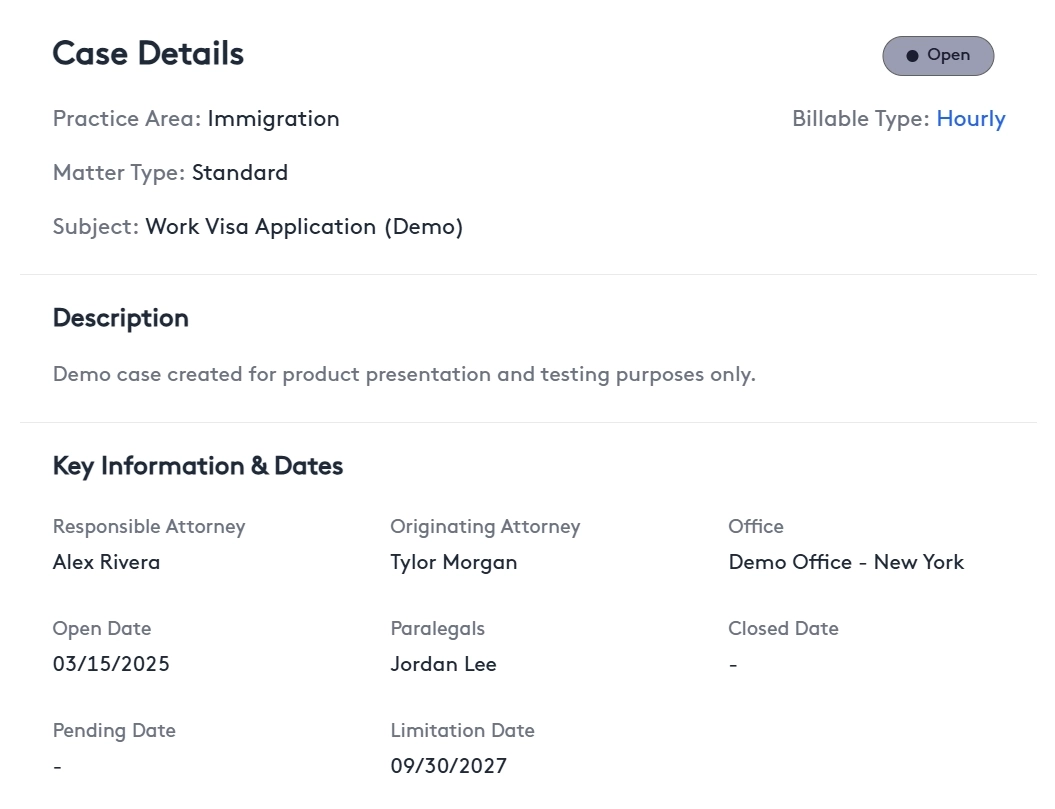
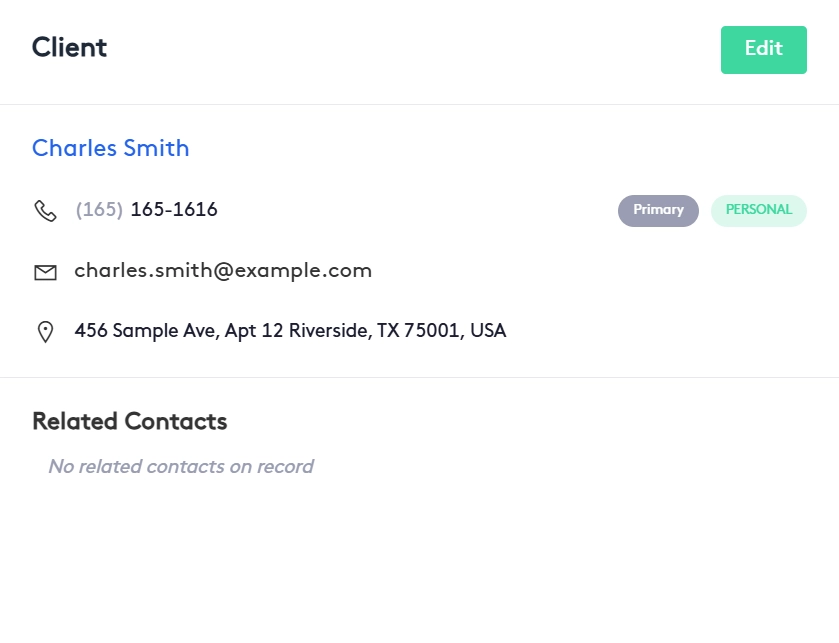
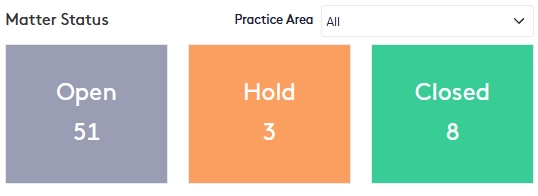
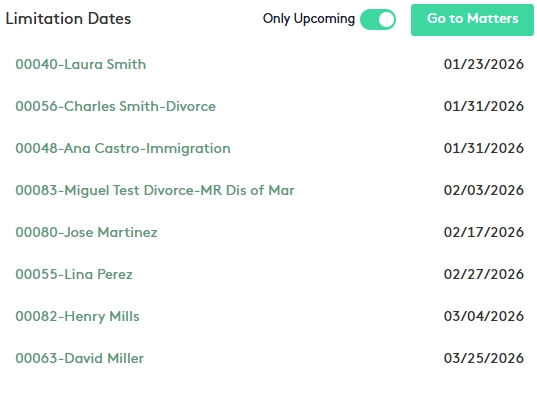
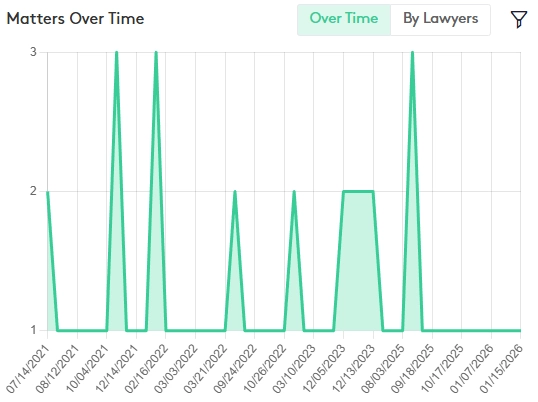
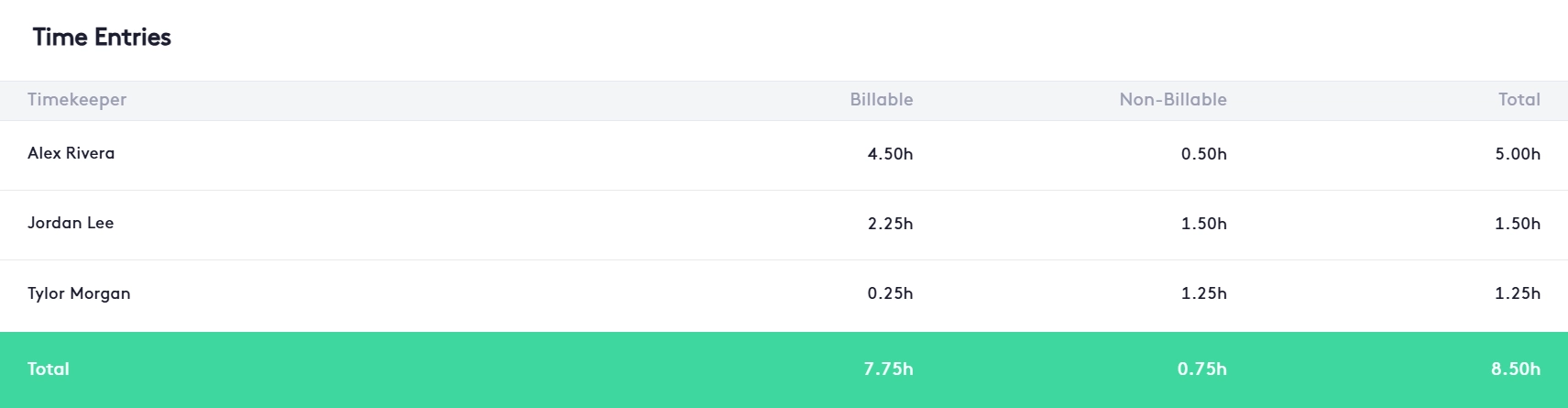
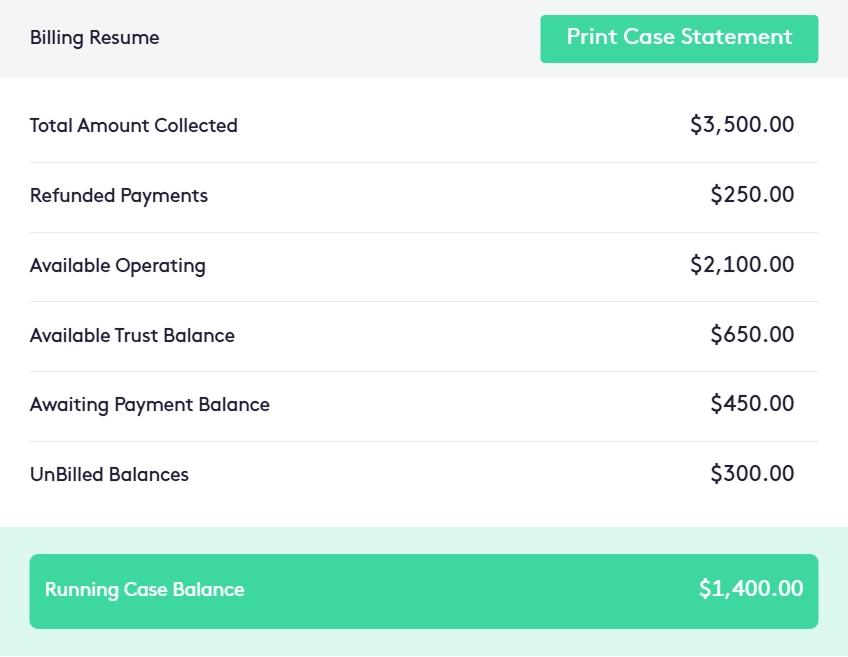
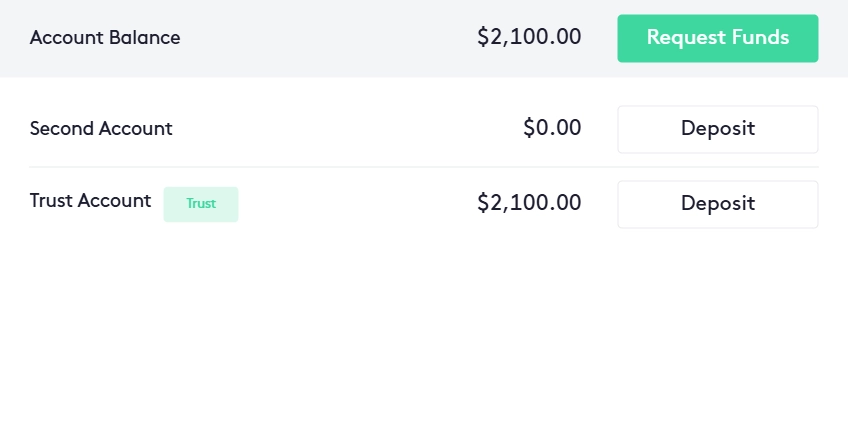
Maatdesk is legal case management software for law firms, built into the same legal practice management platform as your billing, calendar and documents. Every matter opens from one panel: the client, an automatic conflict check, who can see it, a practice area with its own custom fields, the responsible attorney and a statute of limitations date that goes on the calendar. The matter dashboard then keeps the case's notes, tasks, documents, emails, time, bills and payments in eleven tabs, with a feed of every change, and matter statuses, dashboards and reports show where every case stands, in the browser on any computer or phone. Legal case management software is the system a law firm uses to keep everything about a case in one record: who the client is, who else is involved, which deadlines apply, what has been done, which documents and emails belong to it, and what has been billed. Law firm case management software exists because legal work has rules that a shared drive and a spreadsheet do not enforce: a conflict of interest check before a new matter is opened, a client's file open only to the people who should see it, a statute of limitations that must not be missed, and a history of who changed what. Case management systems also exist for healthcare, social services and courts; a legal case management system is built around the matter, the client and the conflict rules a law firm works under. In Maatdesk that job is not a separate product: legal case management is part of the same legal practice management software that bills the work and keeps the calendar. That is what makes it case management software for law firms rather than a folder of files. Every case is a matter. The matter is opened once, from one panel, and everything that happens afterwards — notes, tasks, events, time entries, documents, emails, bills and payments — is recorded on it, so the attorney, the paralegal and the person who sends the bills all read the same record. Information entered once stays connected: the client on the matter is the same client contact record the firm bills and writes to, and a limitation date entered on the matter is the event on the calendar. That is integrated case management software in the plain sense: no second system, and no export between the two. Maatdesk states the limits plainly. The conflict check compares the client with the matters already in Maatdesk; it cannot know about matters the firm never entered. Custom fields belong to a practice area, and changing a matter's practice area discards what was entered in the old form. And Maatdesk is a web app, not a desktop program to install: the same matters open in any browser. Eight screens from Maatdesk's legal case management software, the same for a solo practice or a firm with several offices: a matter's Case Details; the client and related contacts; the firm's Matter Status widget; the Limitation Date widget; Matters Over Time; time by timekeeper on a matter; the matter's billing summary with Print Case Statement; and the balance the matter holds in each bank account. Everything below is the case side of Maatdesk, case management software for attorneys and the staff who work their cases. As lawyer case management software, it follows one rule: a case is opened once as a matter, with its client, its people and its deadlines, and every piece of work afterwards is recorded on that matter rather than in someone's inbox. Click Add Matter in the Matters window or on a client's dashboard, pick the client and type only the matter name: the matter number and client name are added for you. Then add a description, the office, practice area and subject, the responsible and originating attorney, a legal assistant, the open date and any related contacts. As soon as the client is selected, Maatdesk checks whether that contact has been a participant or an adverse party in another matter and shows a Critical Conflict Detected alert. Saving anyway requires confirming a written conflict waiver and a justification. The Conflict of Interest Wizard in the top bar checks a contact before a matter even exists. Permissions are set on each matter: Me, the default, keeps it to its creator; a group or selected users open it to them. Roles decide what each user can do, and the matter team is labelled with professional roles such as Attorney, Case Manager, Law Clerk, Legal Assistant and Paralegal. Build a custom form for any practice area in Settings, in blocks and rows of up to four fields each, required or optional, with default values and pick lists. Choose the practice area on a new matter and its form appears, so a family law matter collects different facts from an immigration matter. Enter a limitation date on the matter and Maatdesk adds an event to the Statute of Limitations calendar and lists the matter in the Limitation Date widget until the date is marked satisfied. Change the date on the matter and the calendar event moves with it. The matter dashboard holds Dashboard, Activities, Notes, Tasks, Bills, Requests, Transactions, Payments, Documents, Feed and Communication. Its Contacts, Details, Time Entries and Financials widgets can be moved and resized, and the Feed keeps a record of every change made on the matter. Write case notes in rich text and save them with the time they took; add tasks; generate documents from templates and send them for e-signature; and assign emails to the matter so they stay on its Communication tab, with their attachments uploaded to the file. Each matter is billed by Hourly rate, Flat Fee, Contingency Fee or Monthly/Retainer Fee, chosen when it is opened. Its Financials widget shows unbilled work by type, the balance in each account and a billing summary, and Add Bill turns the work into an invoice with legal billing. Pick a matter in the Matter Summarizer and click Summarize Matter: Maatdesk's AI matter summary returns the case in sections and saves it as an AI response you can print. It runs on the OpenAI or Gemini account and API key your firm connects. Eight steps, none of them in another application: four to open the matter in Maatdesk, and four to work the case, close it and read it back. Click Add Matter and select the client, or create the contact from the same panel. Maatdesk runs the conflict check at once; a conflict must be reviewed, and saving past it needs a written waiver and a justification. Enter the responsible attorney, originating attorney and legal assistant, choose the office, and set permissions for yourself, selected users or a group. The practice area brings in its custom form. Add the subject, the open date and, if one applies, the statute of limitations date that goes on the calendar. Mark the matter billable and pick Hourly rate with any custom rates, Flat Fee, Contingency Fee or Monthly/Retainer Fee. A retainer request or an initial payment can be recorded as the matter is saved. Notes, tasks, events, time entries, expenses, documents and emails are added from the matter's tabs, so each one is filed to the case the moment it is created. The Dashboard tab shows the client, the case details and dates, time by timekeeper and the matter's finances; the Feed tab shows what changed on the matter and when. When work must stop, change the status to Hold with a note explaining why; when the legal process ends, change it to Closed. A closed matter still takes payments, notes, tasks and emails, but it cannot be billed or edited except to change its status. The Matters window filters by status and exports to PDF, and the dashboard widgets and matter reports described below sum up the whole firm. Legal matter management is the part of case management that answers one question for the whole firm: where does every case stand? In Maatdesk each matter carries one of three statuses, shown as a badge almost everywhere the matter appears. Open is set when the matter is created, and Hold or Closed follow as the case pauses or ends. After a status change, the matter's Open, Pending (for Hold) or Closed date can be filled in to record when it happened. The Matters window is the list every attorney starts from. Status filters show only Open, Hold or Closed matters, the filter panel narrows the list further, the column filter shows or hides columns such as Responsible Attorney and Last Time Entry, and Export to PDF prints what is on screen. The search bar at the top of every screen finds a matter by name or matter number. That makes Maatdesk legal case tracking software as well as law firm matter management software: the case is found in seconds and its status is never a guess. Case visibility for the firm as a whole comes from the dashboard: its Matter Status widget counts Open, Hold and Closed matters by practice area, Matters Over Time shows matters opened over time or by lawyer, and the Limitation Date widget lists matters whose limitation date is overdue or coming up and not yet marked satisfied. The matter reports go further — Matters Over Time, Matters A/R Aging, Activities by Matter and the Matter Balances Summary — each with a filter panel and PDF export, and access to each report can be granted user by user through roles. Together they are what legal matter management software is for: nobody has to ask where a case stands. Many small firms still run their cases from three places: a spreadsheet of open matters, a shared folder for each client and an inbox. Law office case management software exists to replace all three, so the first thing to check when comparing legal case management programs is where the case lives. In Maatdesk it lives on the matter. The difference in one table — a spreadsheet and shared folders against Maatdesk case management: Moving cases out of spreadsheets or another system? See the legal software data migration guide for what moves and how, and the legal software implementation checklist for setting up offices, users, practice areas and matter conventions before the first case is opened. Litigation management software has to track more people than the client. Maatdesk records them on the matter as participants, each with a role and a status, beside the firm's own matter team: Nine roles come built in: Client, Defendant, Opposing Counsel, Witness, Expert Witness, Investigator, Referring Attorney, Class Member and Other. Add your own, such as Adjuster, and give each participant on the matter the role that fits. Approved, Opt-Out, Paid, Pending and Rejected come built in, and the firm can add its own, such as Under Review. They give high-volume litigation and class action matters one standard way to see where each participant stands. A Contingency Fee matter records the attorney's percentage, and its Settlement Ledger follows the settlement from the gross amount received into a trust account, through case costs, medical liens and client advances, to the attorney fee and the net paid to the client, with a Settlement Statement PDF. That is the litigation tracking software side of Maatdesk for plaintiff, mass tort and class action work: each case is still one matter, with its participants, its limitation date, its documents and its settlement on the same record. Cloud-based legal case management software keeps the matters on the provider's servers and opens them in a browser, instead of on one office computer. Maatdesk is a web app, an online case management system: the same matter dashboard opens in Chrome, Safari or Edge on a Mac, a Windows PC, a phone or a tablet, and the layout adapts to the screen. Firms that want legal case management software for a Mac need no download. Access is decided by the firm. Each matter has its own permissions; roles set what users and groups can do on their own matters or on all matters; report permissions are granted report by report, with currency amounts hidden where needed; and billing rate visibility can be limited per user. A deleted matter goes to the Trash, where it can be restored or deleted for good, and a user with related matters cannot be deleted. How Maatdesk handles client data is set out in the privacy policy. Effective legal case management needs firm habits as much as software: every case opened as a matter at intake, conflicts cleared before any work starts, one responsible attorney named on each matter, deadlines entered as soon as they are known, and work recorded on the matter instead of in personal inboxes. Maatdesk builds those habits into the matter: the conflict check runs before it is saved, the responsible attorney and limitation date are fields on the Add Matter panel, and its status shows where the case stands. Maatdesk opens every case as a matter and records everything that follows on it. The matter dashboard's eleven tabs hold its activities, notes, tasks, bills, requests, transactions, payments, documents, change feed and emails, and its Dashboard tab sums up the client, the case details, time by timekeeper and the finances. Information entered once, such as the client or a limitation date, is the same record wherever else it appears. Maatdesk does case management inside the same platform that bills the work, keeps the calendar and stores the documents, so a case is not split across several tools. The firm shapes it to its practice with custom fields for each practice area, its own participant roles and statuses, rearrangeable dashboard widgets and permissions on every matter. The same matter records also feed Maatdesk's AI tools for lawyers, so a case can be summarized without leaving the file. Structured case management cuts the time spent looking for things and makes responsibility visible. In Maatdesk every matter names its responsible and originating attorney, notes can be saved with the time they took, tasks carry a status, and the Feed records each change; the Matters window and the dashboard show the firm's caseload by status and practice area without anyone compiling it. Maatdesk was built with practicing attorneys around the steps a case actually goes through: intake with a conflict check, a responsible attorney and a limitation date; work recorded on the matter; billing by the method agreed with the client; and a status that moves from Open to Hold or Closed. The firm adds what its practice needs, such as custom fields for each practice area, instead of fitting its work into a generic project tool. When everyone on a case reads the same record, fewer things fall between people: the limitation date is on the calendar and the dashboard, the latest notes and emails are on the matter, and the client's balance is in its Financials widget. Clients follow their side in the client portal, where they view and pay invoices and exchange secure messages with the firm. Legal case management software keeps everything about a law firm's cases in one record per matter: the client and other parties, conflict checks, deadlines, notes, tasks, documents, emails, time and billing. In Maatdesk it is the matter side of the practice management platform: one Add Matter panel with an automatic conflict check, custom fields for each practice area, a statute of limitations date on the calendar, and a matter dashboard with eleven tabs. For legal teams, the biggest case management challenges come from one problem: the case lives in too many places. Case details sit in emails, spreadsheets and folders, so deadlines slip and context gets lost; conflicts of interest are found after the matter is opened; a client's file is open to people who should not see it; and the same information is typed into several systems. Maatdesk answers each one on the matter itself: one record per case, a conflict check before the matter is saved, permissions on every matter, limitation dates on the calendar and the dashboard, and information entered once that stays connected. Case management is about the cases; practice management is about running the firm around them. Legal case management software organizes each matter with its people, deadlines, work and documents, while legal practice management software adds billing, trust accounting, calendars, a client portal and firm-wide reports. Maatdesk is both in one plan: case management is the matter side of the same platform. Maatdesk runs a conflict check automatically when a client is selected on a new matter. If that contact has been a participant or an adverse party in another existing matter, a Critical Conflict Detected alert lists the matters to review, and the matter can only be saved after confirming a written conflict waiver is on file and entering a justification. The waiver step mirrors ABA Model Rule 1.7, under which a lawyer can take on a concurrent conflict of interest only if each affected client gives informed consent, confirmed in writing, and some conflicts cannot be waived at all. The Conflict of Interest Wizard in the top bar checks a contact before a matter is created. Only the people the matter's permissions allow. When a matter is created, Me is selected by default, so only its creator can open it; choosing a group gives every user in that group access, and choosing users adds them one by one. Roles then decide what those users can do, on their own matters or on all matters, and changing a matter's permissions later changes who can open it. Yes. A limitation date entered on a matter creates an event on the Statute of Limitations calendar, and while it is not marked satisfied the matter appears in the Limitation Date widget, which lists overdue and upcoming limitation dates. If the date changes later, the calendar event is updated to match. The matter's other events and deadlines are kept on the legal calendar. Yes, by practice area. In Settings, under Practice Management, the firm builds a custom form for each practice area from blocks and rows of up to four fields, with field types, required fields, default values and pick lists; the form appears on every matter opened in that practice area. Changing a matter's practice area later discards the data entered in the old form. Yes. Once a Gmail or other IMAP/SMTP email account is connected, emails can be assigned to a matter from the inbox or while writing them, and they then stay on the matter's Communication tab; their attachments can be uploaded to the matter in one click. The same tab holds call logs and the secure messages exchanged with clients through the portal. Yes, on request. In the Matter Summarizer a user chooses the firm's AI integration and model, picks the matter and clicks Summarize Matter; the summary, organized in sections, is saved as an AI response that can be printed. It runs on the firm's own OpenAI or Gemini account and API key, set up by an administrator. Maatdesk does: it is legal practice management software in which the case, its tracking and its billing are the same matter. The matter's status, limitation date, notes, tasks and documents sit beside its time entries, invoices and payments, the Financials widget shows unbilled work and balances, and Add Bill invoices the matter from the same screen. Case tracking, matter management and legal billing are included in one plan. Yes. Maatdesk is a web app, so matters are opened, updated and closed in Chrome, Safari or Edge on a Mac, a Windows PC, a phone or a tablet, with nothing to install. Case management is included in Maatdesk's single plan: $39 per user per month billed monthly, or $29 per user per month billed annually, with no strict limit on the number of matters. Maatdesk is not free case management software, but new firms that sign up before December 31, 2026 get a 12-month free trial with no credit card required; see pricing for what the plan includes, and our guide to legal practice management software costs for market prices. Moving data in from another system is not charged. The best case management software for solo practitioners and small firms is the one that runs without a second system or an IT person. It should open a matter with a conflict check, keep its deadlines, documents, emails and billing on the same record, and be priced per user. Maatdesk does that on a single plan in the browser, so a one-attorney office can run it on its own. The best legal case management software is the one that keeps the whole case on one record and stops mistakes before they happen. Judge any case management platform on five tests: a conflict check before the matter is saved; access limited matter by matter; limitation dates that reach the calendar and the dashboard; notes, documents and emails filed to the matter rather than to people; and a status and change history anyone can read. Maatdesk passes all five and adds a sixth: billing, the calendar and the client portal are part of the same platform. The same tests pick the best case management software for law firms of any size, from one attorney to several offices.What Is Legal Case Management Software,
and Why Do Law Firms Need It?Legal Case Management Software in Eight Screens
Case Management Software for Lawyers, Built Around the Matter
Open a Matter From One Panel
A Conflict Check Before You Save
Only the People Who Should See It
Custom Fields for Each Practice Area
The Statute of Limitations in View
Eleven Tabs on Every Matter
Notes, Tasks, Documents and Emails on the Case
Billing Set on the Matter
An AI Matter Summary on Request
How Attorney Case Management Software Works in Maatdesk
Open the matter
1. Pick the client and clear conflicts
2. Set who works on it and who can see it
3. Choose the practice area and dates
4. Set the billing method
Work it, close it, read it back
5. Record the work on the matter
6. Read the matter at a glance
7. Put it on hold or close it
8. Read every case back
Legal Matter Management:
Case Visibility Across the FirmLaw Office Case Management Software Instead of Spreadsheets and Shared Folders
Question Spreadsheet and shared folders Maatdesk case management Where the case lives A row in a spreadsheet and a folder on a drive One matter record with eleven tabs Conflict check A search through old files, if someone remembers Automatic when the client is selected, with a waiver on record Who can see a client's file Whoever has the folder link The matter's permissions: its creator, chosen users or a group Statute of limitations A date in one person's calendar An event on the Statute of Limitations calendar and a dashboard widget until satisfied Case notes and emails Personal notebooks and inboxes Notes and assigned emails on the matter's Notes and Communication tabs Practice-specific facts Extra spreadsheet columns A custom form for each practice area What changed and when Hard to tell The matter's Feed of changes Subscription A separate tool for each job, if the firm buys one Included in Maatdesk's single plan What your firm gains
Litigation Case Management: Participants, Contingency Fees and High-Volume Matters
Participants with roles
Participant statuses
Contingency fee matters
Cloud-Based Legal Case Management Software,
on Any Device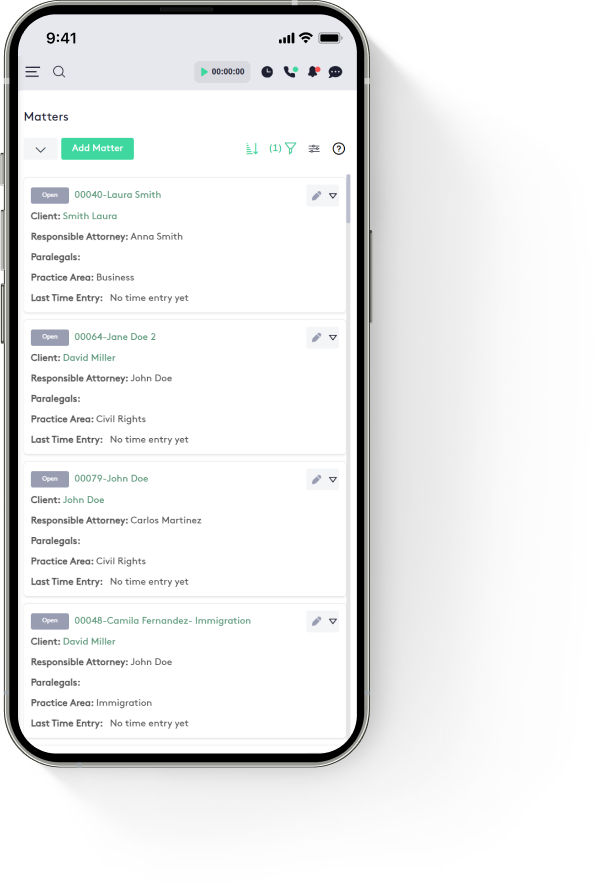
Legal Case Management Software FAQs for Law Firms