
Legal Contact Management Software
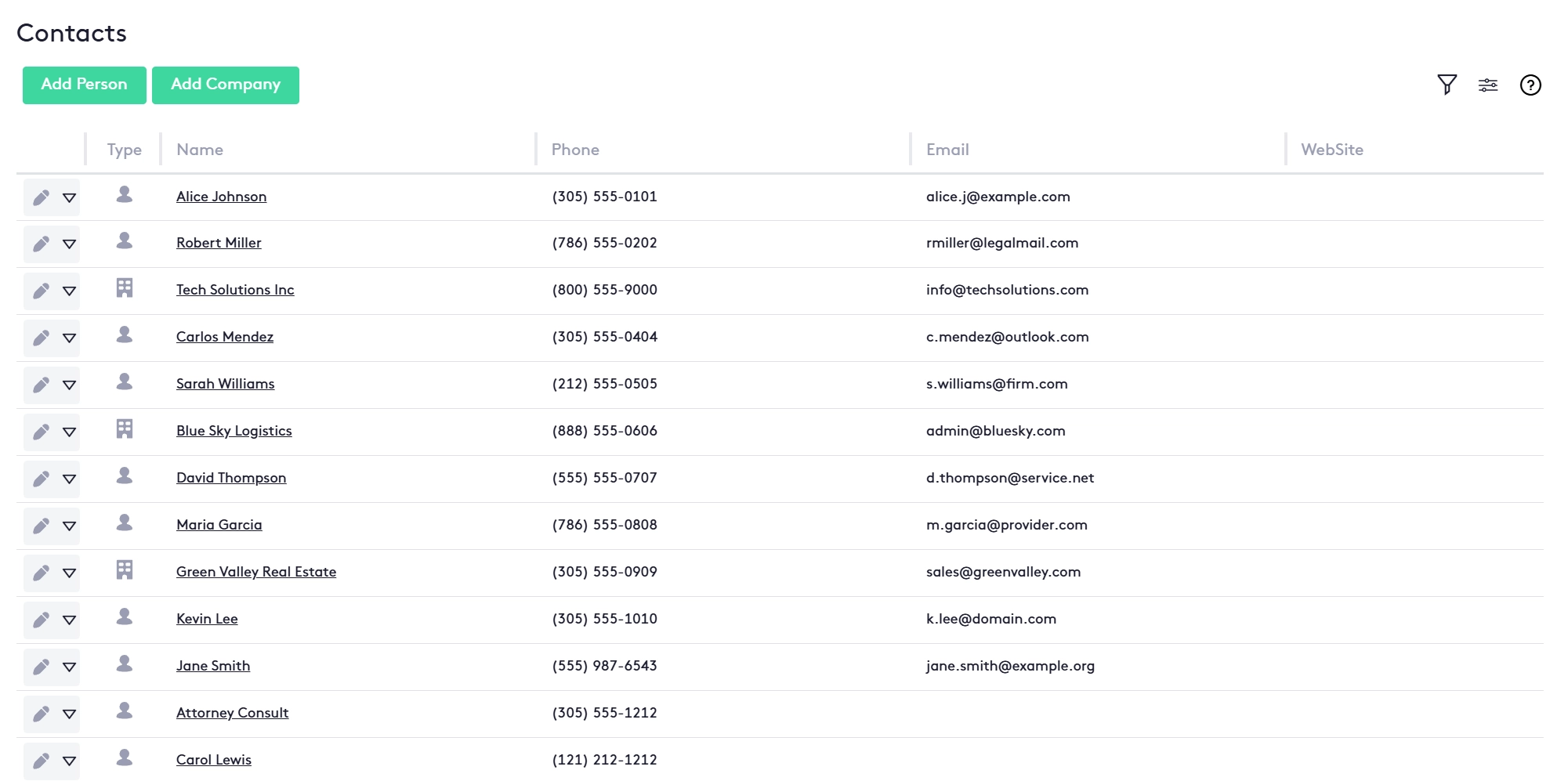
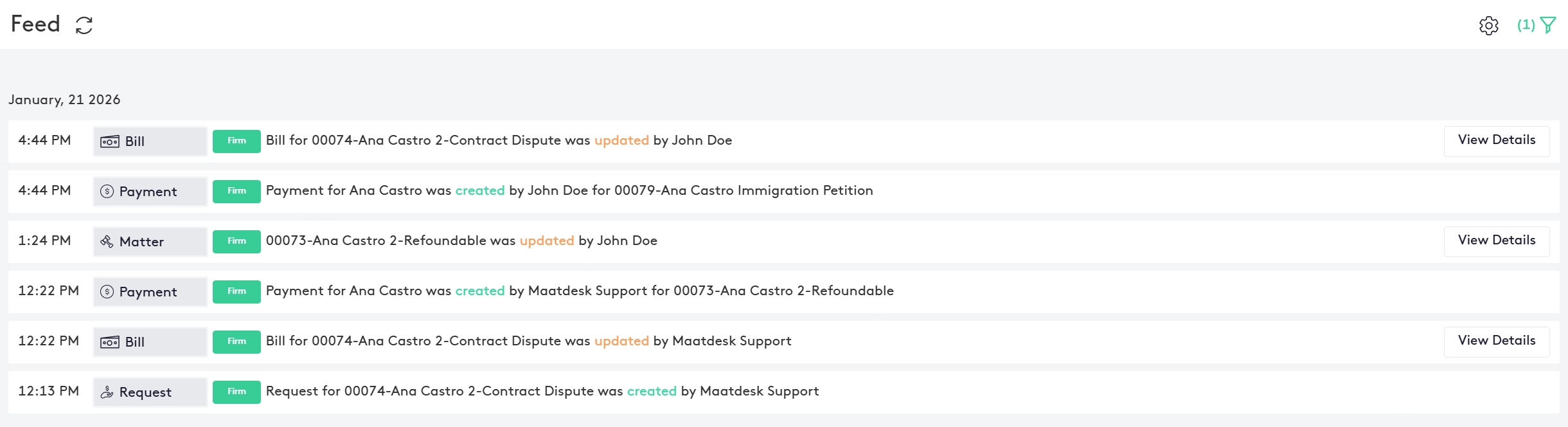
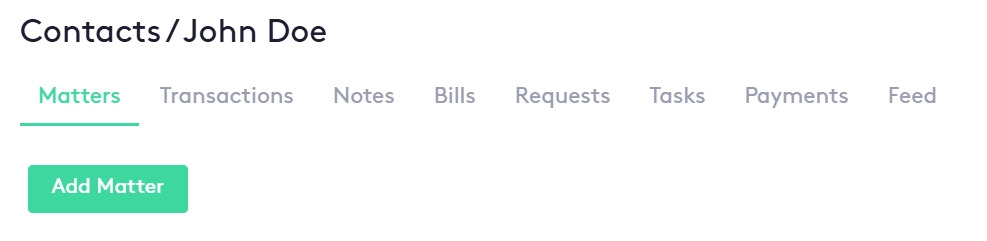
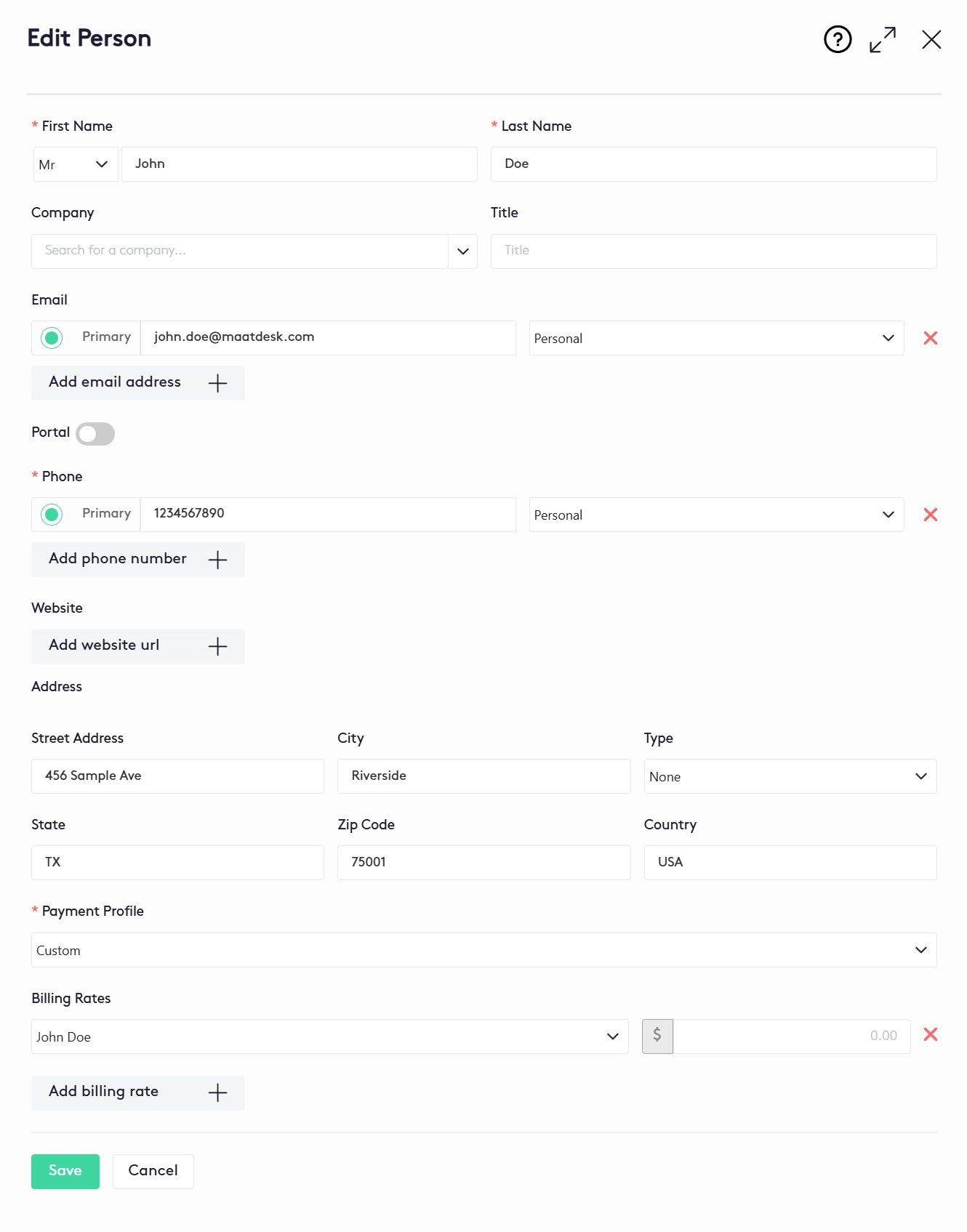
Maatdesk is legal contact management software for law firms, built into the same legal practice management platform as your matters, billing and calendar. Every person and company your firm deals with, client or not, is one contact record: primary email and phone, company and title, typed addresses, a client portal toggle, and the billing rates and payment profile agreed with that client. Name the contact as the client on a matter and Maatdesk runs a conflict check automatically; open the contact and every matter, bill, request and payment behind it is one tab away. No separate CRM subscription, and no address book living in someone's inbox. Legal contact management software keeps every person and company a law firm deals with - clients, opposing parties, co-counsel, experts, vendors - in one contact management system, and ties each record to the matters, bills and payments the firm has with them. In Maatdesk it is not a separate product or stand-alone contact manager software. Contact management software for lawyers is the Contacts module of the same legal practice management software that opens the matter, records the time and sends the bill, so the contact a paralegal creates on Monday is the client an attorney selects on a new matter on Tuesday and the name on the invoice on Friday. That is law firm contact management software in the only sense that saves work: one record, used everywhere. What makes it legal client management software - attorney client management software, if you prefer - rather than an address book is what hangs off the record. Open any contact and its dashboard shows the Matters, Transactions, Notes, Bills, Requests, Tasks, Payments and Feed for that person or company. Centralized contact management here does not mean a bigger list; it means the client's matters, money and history are one tab away from their phone number. The section How Contact Management Works in Maatdesk walks through the record from Add Person to the automatic conflict check. A word on the term firms search for most. Maatdesk is not a legal CRM system in the marketing sense - there is no lead pipeline, no drip campaign, no intake funnel. It is legal client relationship management software in the practicing sense: the relationship the firm has with a client is its matters, its billing rates, its portal access and its payment history, and Maatdesk keeps all of that on the client's record, which is what client relationship management software for law firms should mean. If law firm CRM software is where your client records live today, Maatdesk replaces that job without a second subscription, and a lead tool can still sit in front of it. Maatdesk states the limits plainly. A contact is created by the firm, from the Contacts window or from the Add Matter form, or brought in through the guided contact migration described below; the Contacts module has no intake form builder of its own - client questionnaires in Maatdesk are Jotform forms sent from a matter's Questionnaires tab. A contact with matters or transactions cannot be deleted. And Maatdesk is a web app, not a contact management application to install: the same Contacts window opens in the browser on a phone, tablet or desktop, with no native app to keep updated. Four screens from Maatdesk's legal contact management software, built with attorney input: the Contacts window that lists people and companies with phone, email and website; a client's Feed; the tabs of one contact dashboard; and the Edit Person form where the portal toggle, payment profile and billing rates are set. Everything below is the Contacts module of Maatdesk's legal practice management software. It is contact management software for lawyers in the plain sense: a contact is created once, named as the client or a related contact on a matter, and from then on carries its own billing rates, portal access and conflict check wherever that client appears in the firm. Add a Person or a Company Once and Keep Every Detail on It: Multiple Email Addresses, Phone Numbers, Websites and Addresses, Each With a Type and One Marked Primary. The Contacts Table Shows Phone, Email and Website at a Glance, With a Filter Panel and Column Chooser to Find Anyone Fast. Individuals and Organizations Are Separate Contact Types, Marked by Icon in the Contacts Table. A Person Can Carry a Company and a Title, So the Firm Knows Who Works Where Without Duplicating Records. The Matters Tab on Each Contact Lists Every Matter Linked to That Client, Filterable by Status. Open Date, Responsible Attorney and Originating Attorney Are Set on the Matter, and Time, Flat-Fee and Expense Entries or a Quick Bill Can Be Added Without Leaving the Contact. Each Matter Names One Contact as Its Client and Any Number of Related Contacts, Each With a Relation. A Contact Can Be Created in Place While the Matter Is Opened and Edited Straight From the Matter's Contact Widget. When a Client Is Selected on a New Matter, Maatdesk Runs a Conflict Check Automatically. If That Contact Has Been Involved in Other Cases, a Critical Conflict Detected Alert Requires the Firm to Confirm a Written Conflict Waiver on File and Record a Justification Before the Matter Proceeds. Turn On the Portal From the Contact Record: Maatdesk Sends an Invitation to the Contact's Primary Email, Which Becomes Their Login, and an Unaccepted Invitation Can Be Resent in One Click. What Clients See Once Inside Is on the Client Portal Page. Set Hourly Billing Rates for a User or a Group and Choose a Payment Profile Directly on the Contact, So the Terms Agreed With a Client Are Kept on the Client's Own Record Rather Than in Someone's Notes. The Contact Dashboard Holds a Transactions Tab for Transfers Between Matters and Bank Accounts, a Notes Tab, Bills With Recorded Payments and Refunds, Funding Requests With Payment Plans, the Tasks Assigned to the Contact With Bulk Status Changes, and a Payments Tab With Receipts - All Filtered From One Panel, With the Matters Tab Exportable to PDF and a Feed That Refreshes on the Schedule You Set. The Feed Tab Keeps a Record of the Work and Changes Made to the Contact. Contacts With Matters or Transactions Cannot Be Deleted, and Deleted Contacts Go to Trash, Where They Can Be Restored - So a Client Record Never Disappears With a Departing User. Eight steps, none of them in another application. This is attorney contact management software as a Maatdesk user meets it: four steps to create the record, four to use it across the firm. From the Contacts window click Add Person or Add Company, or click Create new contact while opening a matter. A person takes a prefix, first name and last name, plus a company and title; a company takes its full name. The two types are interchangeable wherever a contact is selected. Add one or more email addresses and phone numbers, each marked work or personal, with one of each set as primary. Add website URLs and a street address with its type. Nothing is limited to one line per field. Switch on the Portal toggle and pick the contact's time zone. Maatdesk sends an invitation to the primary email, which becomes the client's login for the Client Portal. Because that email is the login, a primary email cannot be repeated on two portal-enabled contacts. An unaccepted invitation can be resent from the Contacts window later. Choose a payment profile and add hourly billing rates for a user or a group, as many as the engagement needs. Click Save, and the contact appears in the Contacts table and everywhere else in Maatdesk. Select the contact in the matter's Client field in legal case management. Maatdesk runs a conflict check automatically; if the contact has been involved in other cases, a Critical Conflict Detected alert asks the firm to confirm a written conflict waiver on file and record a justification before the matter proceeds. That is the duty ABA Model Rule 1.7 and Rule 4-1.7 of the Rules Regulating The Florida Bar place on a firm before it takes a matter; Maatdesk puts the check where the client is selected. Add related contacts to the matter, each with a Relation - opposing party, insurer, expert, co-counsel - so the matter's cast is on the record and each of those contacts shows the matter on their own dashboard. Click the contact's name anywhere in Maatdesk to open its dashboard: the Matters tab to add time, flat-fee and expense entries or a quick bill; Transactions, Bills, Requests and Payments for the money; Notes and Tasks for the work; Feed for who changed what and when. Edit from the Contacts window, the contact dashboard or the matter's Contact widget. Changing the primary email changes the portal login. Delete sends the contact to Trash, where it can be restored - unless it has matters or transactions, in which case Maatdesk refuses until those are removed. Law firm client management software earns its keep at three moments, and client management software for lawyers or law office client management software is judged on the same three. Here is what the contact record does at each of them in Maatdesk: A new client arrives as a matter about to be opened. The contact is created from the Add Matter form without leaving it, the conflict check runs the moment the client is selected, the portal invitation goes to their primary email, and their billing rates are on the record before the first time entry. No re-keying into a second system later. The client profile fills itself. Bills, requests and payments post to the contact as they happen; notes and tasks sit on it; related contacts carry the matter on their own dashboards; emails saved through Maatdesk for Gmail attach to the matter, client or task. Anyone in the firm who opens the record sees the same picture. The matter closes; the contact stays, with every matter, bill and payment still on it and Feed still recording changes. When the same client returns, the next matter is opened against the same record - rates, portal login and history intact - and the conflict check now knows the firm's own past work. One record, from the first matter to the tenth. Most firms do law firm client relationship management in three places at once: a contact management tool or CRM software for law firms holds the names, a spreadsheet holds the rates, and an inbox holds the history. Searches for an attorney CRM, a lawyer CRM, a law office CRM, CRM software for lawyers or a legal practice CRM for lawyers mostly return the first of those three. Maatdesk keeps all three on the contact, and the difference shows up at month-end as much as in the workflow. The difference in one table - legal CRM software and legal CRM solutions built for marketing and intake, against the Maatdesk Contacts module: For what a separate client-management subscription adds to the total cost of legal software, see how much legal practice management software costs. Switching legal practice management software usually stalls at the client list. Maatdesk includes a guided contact migration: eligible, structured contact data supplied by your firm in a Maatdesk-supported format is loaded into a secure client contact migration review, where the firm decides how every record is handled before anything reaches your Maatdesk database. Nothing is imported until you say so, and you do not have to finish in one sitting. The process starts with an invitation email. Open the review link and enter the six-digit verification code sent to your email address. The top of the page shows the migration totals: ready, conflicts, errors, resolved, imported and failed contacts. Selecting a row highlights its whole duplicate group. Two different people sharing an email and phone get Create New for both; the same person on two rows with different addresses is merged, and you choose which address to keep or combine one row's primary email with another's extra phone; an exact duplicate gets Create New on one row and Skip on the other; one row holding two people is split into two contacts. A misspelled name is edited, saved and revalidated. Companies are reviewed and imported by company name. Review and Import Ready previews the contacts eligible for this pass. Only ready, resolved and retriable records are processed; pending conflicts and errors stay open. The import runs as a controlled process with its progress shown, imported contacts are marked as imported and locked, and you can come back later for the rest. Open the Contacts window and confirm the imported people and companies are there with their emails, phone numbers and addresses. Every imported contact lands in the same Contacts window, with the same dashboard, billing rates and portal toggle as one created by hand. Contacts in Maatdesk belong to the firm, not to the person who typed them in. Every person and company added to the firm, client or not, is listed in one Contacts window, and what each user can do across Maatdesk's modules is set by the roles and groups the firm defines in Settings - by practice area or job title - rather than by who owns a spreadsheet. A matter can also be limited to selected users or groups when it is opened, so a sensitive client's file is visible only to the people working it. Records are protected from the two ways client data usually disappears. A deleted contact goes to Trash, where it can be restored; and a contact with matters or transactions cannot be deleted at all until those are removed first, so a departing user cannot take a client's history with them. Because Maatdesk is cloud-based legal client relationship management software delivered as a web app, a virtual law firm and a three-office firm see the same contact record. How Maatdesk handles client data is set out in the privacy policy. The walkthrough below is the same law office contact management software the cards above describe, recorded in the product: steps 1 to 4 of How Contact Management Works on camera, then the edit and delete of step 8. Three minutes and thirty-six seconds on how attorney contact management works in Maatdesk: Legal contact management software is the part of a law firm's practice management system that holds every person and company the firm deals with and ties each one to its matters, billing and payments. In Maatdesk it is the Contacts module: a person or company record with typed emails, phones, websites and addresses, a client portal toggle, billing rates and a payment profile, and a dashboard showing that contact's Matters, Transactions, Notes, Bills, Requests, Tasks, Payments and Feed. A legal contact record should carry the matters, billing and payment activity, notes and tasks behind the name, not just an email address. In Maatdesk every contact opens a dashboard with Matters, Transactions, Notes, Bills, Requests, Tasks, Payments and Feed tabs, and that same record is what a matter names as its client. Contact management is included in every Maatdesk plan. The Contacts module is part of the same legal practice management software as matters, billing, calendaring and the client portal, with no separate subscription and no per-contact limit. Legal CRM software is client relationship management software sold to law firms for marketing and lead intake: pipelines, drip campaigns and intake forms that sit before a matter exists. Maatdesk is not a marketing or lead-intake CRM. Whether a firm searches for a legal CRM, CRM for law firms, legal CRM software or CRM for attorneys, the question underneath is where client records should live, and Maatdesk answers it as the contact management module of legal practice management software: contacts exist to be the client or a related party on a matter, to hold billing rates and a payment profile, to receive bills, requests and payments, and to be given client portal access. If your firm needs attorney contact management that lives beside case management, billing and calendaring rather than a separate CRM subscription, that is what the Contacts module is. Yes. When a client is selected on a matter, Maatdesk runs a conflict check automatically. If that contact has been involved in other cases, a Critical Conflict Detected alert appears and the firm must confirm it has a written conflict waiver on file and record a justification before the matter proceeds. That is the legal conflict of interest software most firms are looking for, built into the contact record rather than bought as client conflict check software on its own. From the Contacts window click Add Person or Add Company, or click Create new contact while opening a matter. Enter the name (prefix, first and last name, company and title for a person; full name for a company), add emails and phone numbers with a primary, add websites and an address with its type, switch on the Portal toggle if the client should have portal access, choose a payment profile and billing rates, and click Save. A person contact has a prefix, first name and last name and can be linked to a company with a title; a company contact has a single full name. Both take the same emails, phones, websites, addresses, portal setting, payment profile and billing rates, and both can be selected anywhere a contact is used, so a firm can name an individual or an organization as the client on a matter. Yes. A contact can carry as many email addresses, phone numbers and website URLs as needed, each marked as work or personal, with one email and one phone set as primary. The primary email is the one the client portal invitation is sent to and the one used as the portal login. Client portal access is a toggle on the contact record. Switch it on, choose the contact's time zone, and Maatdesk sends an invitation to the primary email, which becomes the client's login. If the invitation is not accepted, Resend Invitation is one click away in the Contacts window; if the primary email changes, the portal login changes with it, and because it is the login, the same primary email cannot be used on two portal-enabled contacts. Yes. On the contact record, add one or more hourly billing rates, each for a user or a group, and choose a payment profile. The terms the firm agreed with that client are kept on the client's own record. Every matter names one contact as its client and can attach related contacts, each with a relation. A contact can be created in place while the matter is opened and edited from the matter's Contact widget, and its Matters tab lists every matter it is linked to, filterable by status. Emails saved through Maatdesk for Gmail attach to those matters, not to a separate address book. Open the contact's dashboard. Its tabs show the client's Matters, Transactions, Notes, Bills, Requests, Tasks and Payments, and the Feed tab keeps a dated record of the work and changes made to the contact - a bill updated, a payment created, a matter changed - with who did it and a link to the details. Attorneys, paralegals and billing staff who share the same clients get the most from law firm contact management software. Because a contact is created once and reused on every matter, the responsible attorney, the person recording time and the person sending the bill all work from one record with one primary email and one primary phone. Contacts belong to the firm, not to an inbox. The Contacts window lists every person and company added to the firm, whether a client or not, with a filter panel and column chooser; the Feed tab on each contact records the work and changes made to it; and contacts with matters or transactions cannot be deleted, so a client record never disappears with a departing user. A deleted contact moves to Trash, where it can be restored or permanently removed. A contact that has matters or transactions cannot be deleted at all; Maatdesk refuses until those matters or transactions are removed first, which protects the firm's client history from accidental deletion. Yes. Maatdesk is a web app, so the Contacts window, the Add Person form and every contact dashboard open in the browser on a phone, tablet or desktop with nothing to install. There is no separate native app to keep updated. Yes. Maatdesk includes a guided contact migration: eligible, structured contact data supplied by your firm in a Maatdesk-supported format is loaded into a secure client contact migration review, opened from an invitation email with a six-digit code. The review shows every record as ready, a conflict or an error; you resolve duplicates with Create New, Merge, Skip or Split, edit and revalidate anything misspelled, and import in passes - only ready, resolved and retriable records go in, and imported contacts are then locked. Data reconstruction, manual entry, extraction from unstructured files and extensive cleansing are not included and need a separate scope. The migration review groups duplicate contacts and highlights the whole group when you select a row. Two different people sharing a phone or email - a couple, for instance - get Create New for both; the same person on two rows with different addresses is merged, and you choose which address to keep or combine one row's primary email with another's extra phone; an exact duplicate gets Create New on one row and Skip on the other; a single row holding two people is split into two contacts. Nothing is imported until you have chosen. The best contact management software for law firms is the one attached to the matter, because that is where a client's history actually lives. Four tests: the client record should be the same record the matter names as its client; billing rates and portal access should sit on the contact, not in a spreadsheet; a conflict check should run when the client is selected, not when someone remembers; and the record should be impossible to delete while it has matters or transactions. Maatdesk passes all four and adds a fifth that matters for client management software for attorneys: it is part of the practice management platform the firm already bills from, so there is no second subscription.What Is Legal Contact Management Software for Law Firms
and Why Built-In Matters?Law Firm Contact Management, Perfectly Organized.
Contact Management Software for Law Firms, Built Around the Matter
Every Contact in One Record
People & Companies
Client Matter History
Clients and Related Contacts on Every Matter
Automatic Conflict of Interest Check
Client Portal, Enabled Per Contact
Billing Rates and Payment Profile on the Contact
Notes, Bills, Requests and Payments in One View
Contact Feed and Protected Records
How Contact Management Works in Maatdesk
Create the record
1. Add a person or a company
2. Enter the ways to reach them
3. Decide on portal access
4. Set how they are billed
Use it across the firm
5. Name the client on a matter
6. Attach everyone else
7. Work from the contact dashboard
8. Edit, resend or delete
Client Contacts Across the Life of a Matter
Intake
During the matter
Closing and the next matter
One Client Record Instead of a Law Firm CRM, a Spreadsheet and an Address Book
Question A marketing legal CRM Maatdesk Contacts Where the client record lives In the CRM, apart from the matter On the matter, as its Client field Lead pipeline and intake forms Its core job Not included - contacts are created by the firm or migrated Billing rates and payment profile Usually elsewhere On the contact record Conflict of interest check Varies by product Automatic when the client is selected on a matter Client portal access Separate tool, if any A toggle on the contact Matters, bills, requests, payments Synced from elsewhere, if integrated Tabs on the contact dashboard Subscription A second one, even for a CRM for small law firms Included in every Maatdesk plan What your firm gains
Contact Migration: Bring Your Existing Client List Into Maatdesk
How the contact migration review works
1. Open the review
2. Resolve each duplicate group
3. Import in passes
4. Check the result
What is included, and what is not
Client Data, Permissions and Records
That Do Not DisappearLegal Contact Management Software in Action: Add, Edit and Delete a Contact
Legal Contact Management FAQs for Law Firms