
Legal Time Tracking Software
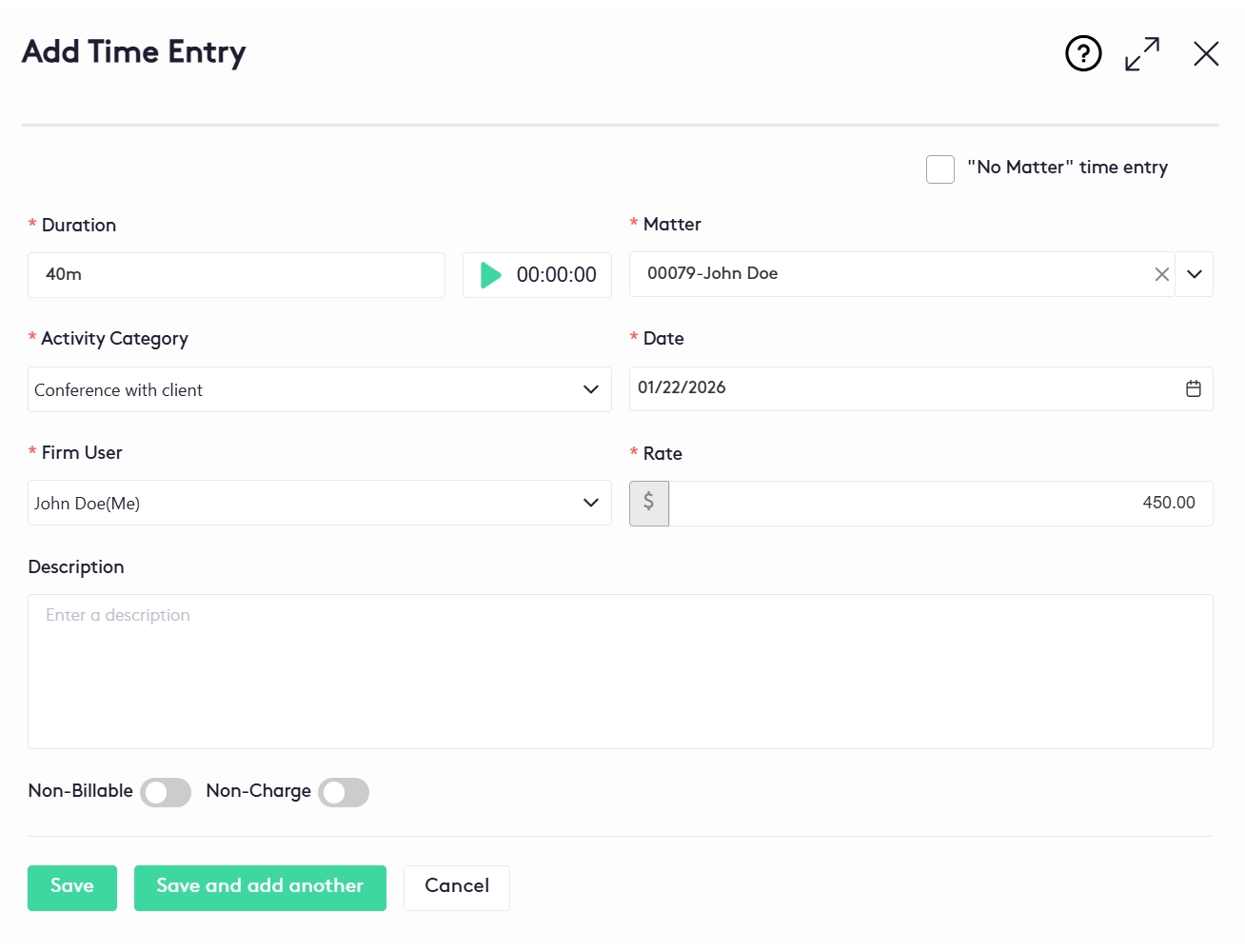
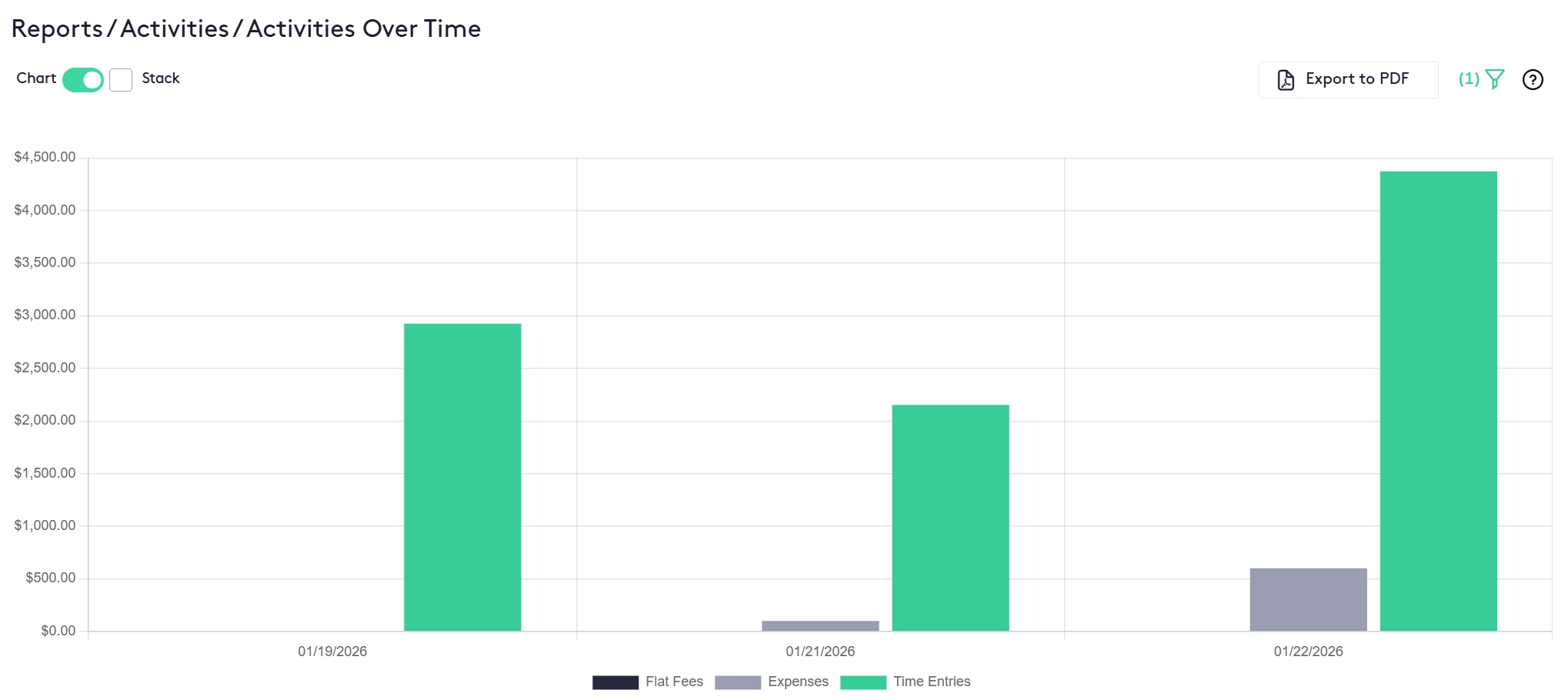
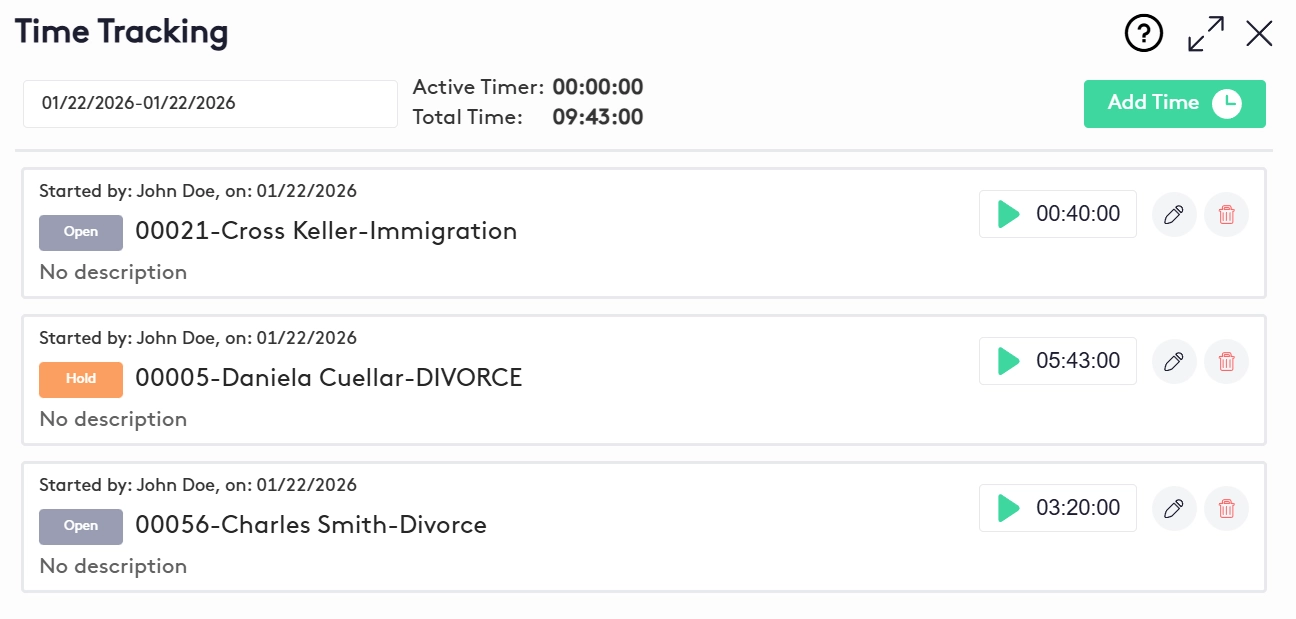
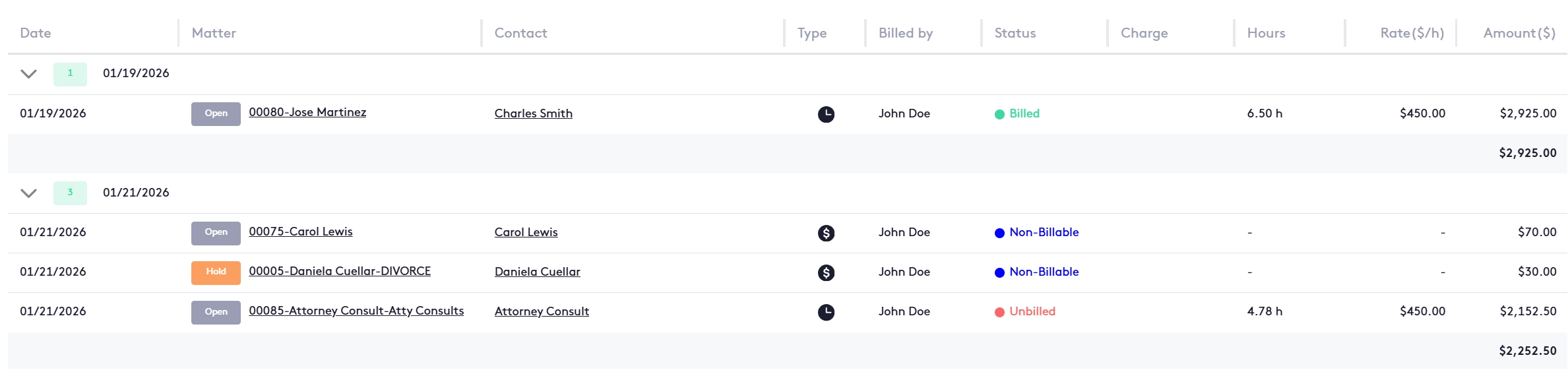
Maatdesk is legal time tracking software for law firms, built into the same legal practice management platform as your matters, billing and calendar. Start the timekeeper on the top bar or on any time entry, or type the duration later; each entry carries its matter, an activity category that sets the rate, and a billable, non-billable or no-charge status. Unbilled time waits on the matter until a Quick Bill loads it onto the client's invoice, and billed time stays locked. Legal timekeeping and billing in one system, in the browser on any computer or phone, with nothing to install. Legal time tracking software is where a law firm's hours turn into revenue: each piece of work lands on its matter, is priced at the rate the firm agreed, and moves on to the invoice. Legal timekeeping software is the same thing under the name law firms have always used for it - the attorney timekeeper is the lawyer whose hours are billed - so attorney timekeeping software, law firm timekeeping software and timekeeping software for lawyers all describe one job: every billable minute recorded against the right client, at the right rate, while the work is fresh. In Maatdesk that job is not a separate product: time tracking for law firms is part of the same legal practice management software that opens the matter and sends the bill. That is what makes it legal time and billing software rather than a stopwatch. A time entry in Maatdesk belongs to a matter, carries an activity category that decides its rate, and waits as Unbilled until a Quick Bill loads it onto the client's invoice. The attorney who starts the timer, the paralegal who reviews the entries and the person who sends the bill all work on the same record, so time and billing software for law firms stops meaning two systems and an export between them. Maatdesk's time tracking was designed alongside practicing attorneys, as the product video under the heading above puts it, to capture time live, on a phone, or later. The section How Legal Time Tracking Works in Maatdesk walks through a time entry from the first click on the timer to the invoice. Maatdesk states the limits plainly. There is no passive, automatic time capture: time is recorded when a lawyer starts a timekeeper, types a duration, or saves a time entry from a note, event or task, and only one timekeeper runs at a time. And Maatdesk is a web app, not a time tracking app to install: the same timer and time entries open in the browser on a phone, tablet or desktop. Five screens from Maatdesk's law firm time tracking software, the same law office time tracking software for a solo practice or a firm with several offices: the Add Time Entry panel with its built-in timer; the billable, billed, unbilled and non-billable totals; the Activities Over Time report; the Time Tracking panel with a timer on each matter; and the activities list where every entry shows its matter, rate, hours and status. Everything below is the time-entry side of Maatdesk's legal practice management software. It is lawyer time tracking software, time tracking software for attorneys and time entry software for law firms in the plain sense: a lawyer's time is recorded once, on the matter it belongs to, at the rate the firm agreed, and it stays on that matter until it is billed. Start the timekeeper on the top bar from any screen and Maatdesk saves a new time entry at once - a legal timer that is also a legal time tracker, because the time lands on a record, not a stopwatch. Keep working while it runs; when you stop it, the entry opens so you can add the matter and the activity category. The same timekeeper appears in the My Tasks widget for tasks with a time entry, the activity table, the time entry panel and the Time Tracking panel. Only one runs at a time, so starting a new one stops the last and no hour is counted twice. Forgot the timer? Type the duration the way you think of it - 1h 2m, 72min, 01:12:00 or 0.2h - pick the date the work was done, and save. Save and Add Another keeps the panel open for the next entry. When a note, a calendar event or a task is linked to a matter, Save and Associate Time Entry records the time in the same step, so the call, the hearing or the draft carries its own time entry. Each time entry takes an activity category, such as "Conference with client". The category's billing method - Use Default Rate, Custom Rate or Flat Rate - fills in the rate, and any rate can still be overridden on the entry. Mark an entry Non-Billable to keep it off the invoice, or Non-Charge to show the work on the invoice at no charge and without tax. Billable time stays Unbilled until it is billed. Training, firm administration and business development can be recorded as No Matter time entries. They are Non-Billable by default, so the firm sees where the whole working day went, not only the billed part of it. Unbilled and Non-Billable entries can be edited or deleted. Once a saved bill includes an entry, the entry becomes Billed and changes only through that invoice, and time on a closed matter cannot be added or edited. The Work recorded widget shows your hours and amounts for any period. The Activities Over Time, Activities by Matter and Activities by Contact reports break time down further; the Productivity Report makes it law firm productivity software as well as a time tracker; every report exports to PDF; and the AI matter summary reads a matter's time entries too. Eight steps, none of them in another application. This is attorney time tracking software and legal time entry software as a Maatdesk user meets it: four steps to record the time, four to bill it and read it back. Start the timekeeper on the top bar, on an existing entry, or from the My Tasks widget for a task with a time entry. Or click Add Time in the Activities window, Add Time Entry on a matter, Time Entry in the matter's Financials widget, or Save and Associate Time Entry on a note, event or task. A running timekeeper updates the entry's duration and amount when it stops. A manual duration can be entered as 1h 2m, 1h2m, 72min, 01:12:00 or 0.2h. Only one timekeeper runs at a time. Pick the matter (or tick No Matter for internal time), the activity category, the date and the user who bills it. The rate fills in from the category's billing method and the matter, client, user and firm rates, and can be overridden. Leave it billable, tick Non-Billable to keep it off the invoice, or Non-Charge to show it at no charge. A billable entry saves as Unbilled and the matter's Financials widget updates straight away. Every time entry, expense and flat fee is listed with its matter, contact, user, status, hours, rate and amount, with a filter panel and totals for billable, billed, unbilled and non-billable hours. Unbilled entries can be edited from the list or the Time Tracking panel. Law firm expense tracking works in the same window: an expense is added with Add Expense, takes its own activity category, and is billed with the time. That is expense management for law firms without a second tool. Open a Quick Bill for the matter and Maatdesk loads every unbilled time entry, expense and flat fee for it, organized by type, into a single invoice. Entries can still be added, edited or removed on the bill. Saving the invoice marks its time entries Billed. From then on they change only by editing the invoice. Approval applies to the bill: Skip Approval Process is checked by default, and unchecking it saves the invoice as a Draft for review. The Activities Over Time and Productivity reports chart the firm's time by date and by user, and export to PDF. Law firm time and billing software earns its keep at three moments, and lawyer time and billing software - attorney time and billing software, if you prefer - is judged on the same three. Here is what a time entry does at each of them in Maatdesk, where legal timekeeping and billing software, or legal time tracking and billing software, is one system rather than two: The timekeeper runs on the matter while the lawyer works, or the time is saved with the note, event or task that produced it. The activity category sets the rate, so the entry is priced the moment it is recorded - no rate table to look up at month-end. Unbilled time sits on the matter, visible in the Activities window and the matter's Financials widget. Anyone reviewing it can correct a duration, a category or a description, mark a courtesy entry Non-Charge, or move internal work to Non-Billable before anything reaches the client. A Quick Bill loads the matter's unbilled time entries, expenses and flat fees into one invoice, shown line by line or as a summary. Saving it marks the time Billed and locks it, and the client can view, pay and download the invoice in the client portal. That is time and billing software for law firms in one sentence: the time entry and the invoice line are the same record. It works the same way as time and billing software for lawyers or time and billing software for attorneys in a larger firm, as time billing software for solo attorneys, and as timekeeping and billing software for attorneys who share clients with paralegals and billing staff. What the invoice itself can do - payment plans and payment from operating and trust funds - is on the legal billing software page. Many firms still keep time in three places: an attorney timesheet or an attorney time tracking template in a spreadsheet, a stopwatch on a phone, and a billing system someone re-keys it all into at month-end. Legal time recording software and legal time management software exist to remove the re-keying. In Maatdesk the time is recorded where the matter is, which is what law firm time recording software and law firm time management software should mean - and what firms comparing attorney time management software, time management software for lawyers or time management software for law firms are asking for. The difference in one table - a spreadsheet timesheet against Maatdesk time entries: For what a separate time tracking subscription adds to the total cost of legal software, see how much legal practice management software costs, and, for why tracking time matters at all, the benefits of time tracking software for law firms. How do lawyers track their time? Lawyers track billable hours by recording each piece of work against the client matter it belongs to, with its duration, a description and the rate that applies, as close to the moment it happens as they can. Time reconstructed at the end of the week is time forgotten: every untracked minute is lost revenue. A fee also has to be reasonable and explained to the client under ABA Model Rule 1.5, and that is far easier to show from a dated entry per task than from a weekly total. Lawyer time tracking in Maatdesk follows that practice. Time tracking for lawyers and time tracking for attorneys start from the timekeeper on the top bar or on the entry, or from Save and Associate Time Entry on the note, event or task that produced the work; each entry carries its matter, activity category, user, rate and description; and legal billable hour tracking happens in the Activities window, which totals billable, billed, unbilled and non-billable hours and amounts. As software for managing billable hours, it keeps every recorded hour in view: an unbilled entry stays on its matter and in the Activities window until it is billed, so nothing recorded is left off an invoice by accident. That is what time tracking for law firm profitability comes down to: fewer hours lost between the work and the invoice. A time record is only useful if it can be trusted later. In Maatdesk only Unbilled and Non-Billable entries can be edited or deleted; a Billed entry changes only by editing the invoice that contains it; and time on a closed matter cannot be added or changed. Editing an activity category never rewrites the rates on entries already recorded, and each category can be limited to the groups that should use it. Firms searching for a lawyer time tracking app or an attorney time tracking app can stop looking for a download: Maatdesk is a web app, so time is logged from the phone's browser after court with nothing to install - the phone question in the FAQs below has the details. How Maatdesk handles client and billing data is set out in the privacy policy. Recorded time does not disappear into a billing screen. On the Maatdesk dashboard, the Activities Over Time view charts the week's time entries beside expenses and flat fees, and the Work recorded widget shows each attorney's hours and amounts for the period, so the firm sees its billable work without leaving the page it starts the day on. For the full picture, the Activities Over Time report in the Reports module adds a filter panel, a stacked view and Export to PDF. Twenty-eight seconds on how that looks in Maatdesk: Legal time tracking software records the time lawyers spend on each client matter, prices it at the agreed rate and passes it to billing. In Maatdesk it is the time-entry side of the practice management platform: a timekeeper on the top bar and on every entry, manual durations in any common format, an activity category that sets the rate, billable, non-billable or no-charge status, and a Quick Bill that loads unbilled time onto the invoice. There is no practical difference: legal timekeeping software is the older, law-firm name for legal time tracking software. The timekeeper is the attorney or paralegal whose hours are billed, so attorney timekeeping software, lawyer timekeeping software, timekeeping software for attorneys and timekeeping software for law firms all mean software that records each timekeeper's time by matter at the right rate. In Maatdesk the user who bills a time entry is set on the entry, and the rate follows that user. Time tracking is included in every Maatdesk plan. It is part of the same legal practice management software as matters, billing, tasks, calendaring and the client portal, so time entries and invoices live in one system and there is no separate time tracker to subscribe to or sync. In Maatdesk, lawyers track billable hours in three ways: a timekeeper started from the top bar or on a time entry, a duration typed in after the fact, or Save and Associate Time Entry on the note, event or task that produced the work. Every entry lands on its matter at the category's rate, and the Activities window totals billable, billed, unbilled and non-billable hours. The law timer in Maatdesk is the timekeeper on the top bar: it saves a new time entry the moment it starts, and when it stops the entry opens so the matter and activity category can be filled in. Timekeepers also appear in the My Tasks widget for tasks with a time entry, in the activity table, in the time entry panel and in the Time Tracking panel; stopping one updates the entry's duration and amount. A timekeeper starts only on an entry that is not Billed and on which you are the billing user. No. Only one timekeeper runs at a time in Maatdesk, so starting a timer on one matter stops the one that was running. You can keep working anywhere in Maatdesk while it runs, and the Time Tracking panel shows the active timer and the total time for the day. No, Maatdesk does not capture time passively in the background. Time is recorded when you start a timekeeper, type a duration, or save a time entry together with a note, event or task linked to a matter. What Maatdesk does automatically is the bookkeeping: the top-bar timekeeper saves the entry the moment it starts, the rate fills in from the activity category, and a Quick Bill loads unbilled time onto the invoice. Yes. In the Add Time Entry panel, type the duration as 1h 2m, 1h2m, 72min, 01:12:00 or 0.2h, change the date to the day the work was done, and save; Save and Add Another keeps the panel open for the next entry. Time can also be added from the Activities window, from a matter, from the matter's Financials widget or while creating a bill. The rate comes from the entry's activity category. A category with a Custom Rate or Flat Rate billing method applies its own rate; a category set to Use Default Rate looks for the user's rate on that matter, then the user's rate for that client, then the user's own rate, then the firm-wide rate, with a group rate used when the user has none. Any rate can be overridden on the entry, and editing a category does not change entries already recorded. A Non-Billable time entry is kept off the invoice altogether. A Non-Charge entry appears on the invoice so the client can see the work, but the client is not charged for it and no tax is applied. Non-Charge is available only on billable entries, and No Matter entries are Non-Billable by default. Yes. Tick No Matter in the Add Time Entry panel to record internal time such as training or firm administration. A No Matter entry has no matter or rate and is Non-Billable, so it shows where the working day went without reaching an invoice. Time entries reach the invoice through a Quick Bill, which is what makes Maatdesk legal time billing software rather than a timer alone. Open a Quick Bill for the matter and its unbilled time is already on the invoice, beside its expenses and flat fees; saving the bill marks those time entries Billed. Steps 6 and 7 above cover editing the bill and the optional approval. Not directly. A Billed time entry changes only by editing the invoice that contains it, and the entry updates when that invoice is saved. Unbilled and Non-Billable entries can be edited or deleted; removing an entry from a bill makes it available for another invoice; and time on a closed matter cannot be added or edited. Clients see time entries as part of their invoices. When a bill is set to show all details, each activity appears as its own line item, and the client can view, pay and download that invoice in the client portal. Unbilled time and Non-Billable entries are never on an invoice, so clients do not see them. Yes. Maatdesk is a web app, so the timekeeper, the Add Time Entry panel and the Time Tracking panel open in the browser on a phone or tablet with nothing to install. There is no separate time tracking app to keep updated, and an entry saved on the phone is what the billing team sees at the office. The Work recorded widget on the dashboard shows each user's hours and amounts for a chosen period. The Activities Over Time report charts time entries, expenses and flat fees by date; Activities by Matter and Activities by Contact show what is billed and unbilled per matter and client; and the Productivity Report charts activity by status and by time or amount. Each report exports to PDF, and more are on the management reports page. The best legal time tracking software for law firms is the one that records time on the matter and bills it from there, and the same answer holds for the best legal timekeeping software or the best legal time and billing software. Four tests: a timer that is one click from any screen; rates that fill in from the category and the client rather than a spreadsheet; billable, non-billable and no-charge time kept apart on every entry; and billed time that cannot be changed without changing the invoice. Maatdesk passes all four and adds a fifth for time and billing software for law firms: it is part of the practice management platform the firm already runs its matters and invoices from.What Is Legal Time Tracking Software,
and How Is It Different From Legal Timekeeping Software?Law Firm Time Tracking in Five Screens

Time Tracking Software for Lawyers, Built Into Every Matter
A Lawyer Timer on the Top Bar
One Timer, Wherever You Work
Manual Time Entry in Any Format
Time From Notes, Events and Tasks
Activity Categories That Set the Rate
Billable, Non-Billable and Non-Charge
"No Matter" Time for Internal Work
Billed Time Is Locked
Hours, Amounts and Productivity Reports
How Legal Time Tracking Works in Maatdesk
Record the time
1. Start a timekeeper, or open a time entry
2. Let it run, or type the duration
3. Choose the matter, category and user
4. Mark it billable or not, and save
Bill it and read it back
5. Review in the Activities window
6. Create a Quick Bill
7. Save the bill
8. Read the hours back
Legal Time and Billing Software: From the Timer to the Invoice
While the work happens
Before the bill
On the invoice
Legal Timekeeping Software Instead of an Attorney Timesheet
Question A spreadsheet timesheet Maatdesk time entries When the time is recorded At the end of the day or the week, from memory While the timer runs, or with the note, event or task that produced it Where the rate comes from A separate rate table, looked up by hand The activity category, then the matter, client, user and firm rates Billable or not A column someone has to remember to fill Billable, Non-Billable or Non-Charge on every entry Getting time onto the invoice Copied into the billing system A Quick Bill loads every unbilled entry for the matter After the bill goes out The row can still be changed The entry is Billed and changes only through the invoice Hours by attorney and matter Pivot tables Work recorded widget and Productivity, Activities by Matter and Activities by Contact reports Subscription A separate time tracker, if the firm buys one Included in every Maatdesk plan What your firm gains
How Do Lawyers Track
Billable Hours?Time Records That Hold Up,
on Any DeviceLaw Firm Time Tracking on the Dashboard: Activities Over Time
Legal Time Tracking FAQs for Law Firms